An IVR number for business is a phone number with an automated voice menu. When a customer calls, the IVR greets them, offers options such as "Press 1 for sales, Press 2 for support", and sends the call to the right team. In India, you get one by taking a virtual, local or toll-free number, completing KYC and setting up your menu. With DialDesk, numbers are activated the same day after KYC, and plans start at ₹499/month for a local number.
Key Takeaways
- An IVR number is a business number with a recorded menu that routes callers to the right department.
- IVR can run on a local, virtual or 1800 toll-free number.
- Main types: single-level, multi-level, toll-free IVR and AI (voice) IVR.
- You need KYC documents such as company PAN, GST certificate and ID proof of the authorised person.
- Cost depends on the number type, call minutes, menu levels and integrations.
What is an IVR Number?
IVR stands for Interactive Voice Response. An IVR number is a business phone number connected to a cloud system that answers calls automatically, plays a welcome message and asks callers to choose an option by pressing a key or speaking. The system then connects the caller to the right person, plays information, or takes a message. The business does not need any hardware in the office, because everything runs on the cloud.
How Does an IVR Number Work?
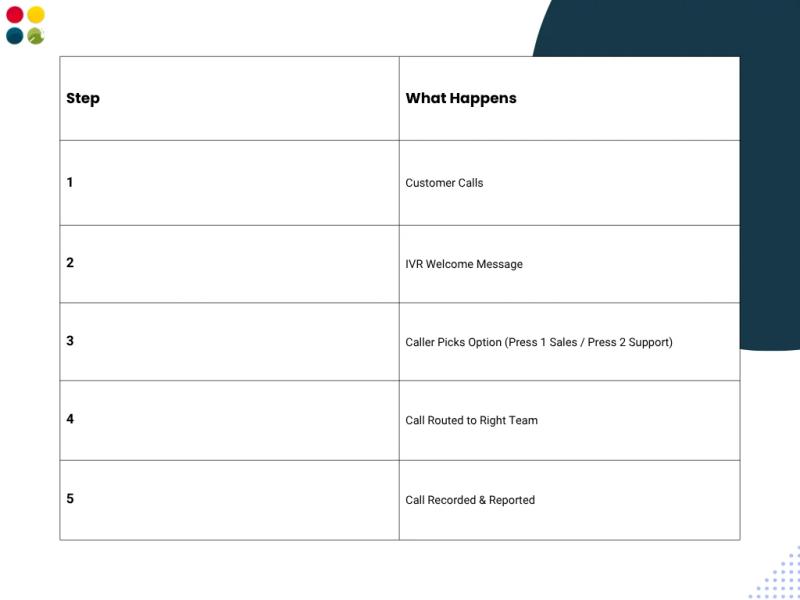
- The customer dials your IVR number.
- The cloud system answers and plays your recorded welcome message.
- The caller picks an option, for example sales, support or order status.
- The call is routed to the right agent, team or mobile number. If no one is free, the caller can wait in a queue or leave a voicemail.
- The call is recorded and logged, so you can see call reports later.
Why Do Businesses Use an IVR Number?
- Every call gets answered, even after office hours.
- Callers reach the right team the first time, with fewer transfers.
- Simple questions, such as timings or order status, can be answered by the menu itself.
- A small team sounds like a large, organised company.
- Call recordings and reports help you track missed calls and agent performance.
What Are the Types of IVR for Business?
Single-Level IVR
One menu with a few options, such as "Press 1 for sales, Press 2 for support". It suits small businesses with two or three teams.
Multi-Level IVR
A menu with sub-menus, for example language first, then department, then product. It suits companies with many teams or regions. Read more on how IVR trees improve call routing.
Toll-Free IVR
An IVR menu on an 1800 number, so customers call free of charge. It is common for customer care lines. See our guide to the 1800 toll-free number for business.
AI or Voice IVR
Callers speak instead of pressing keys, and the system understands what they need. It can also qualify leads before passing them to an agent. See how DialDesk used an intelligent IVR for a digital financial services company.
IVR Number vs Normal Business Number
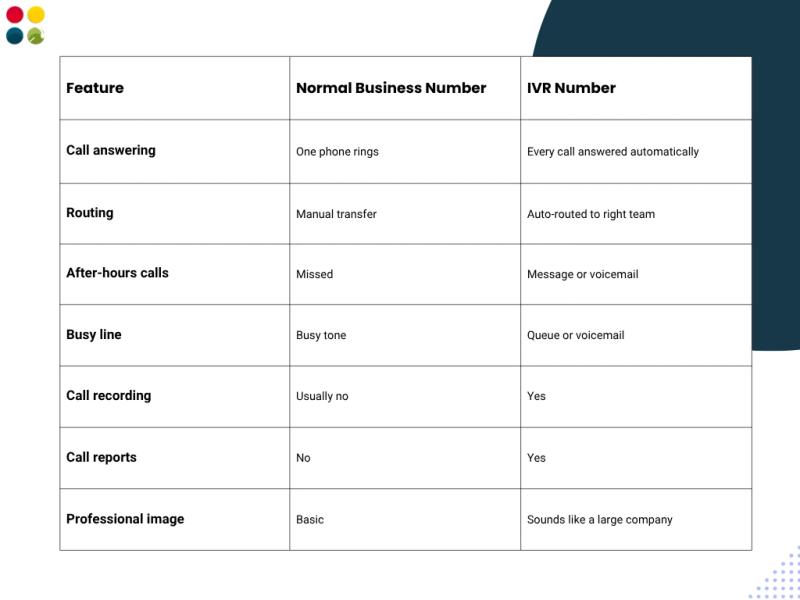
A normal business number rings one phone, so calls are missed when that person is busy or away. An IVR number answers every call, sorts callers by need and sends them to the right team, with recording and reports for each call. The table below shows the main differences.
What Features Should a Business IVR Have?
- Custom welcome message: your own greeting, in the language your customers speak.
- Call routing: send calls to departments, agents or mobile numbers.
- Office hours rules: a different message or voicemail after hours and on holidays.
- Call queue and voicemail: no caller gets a busy tone.
- Call recording and reports: listen to calls and see missed, answered and total calls.
- CRM integration: caller details and call logs go straight into your CRM.
How to Design a Good IVR Menu
- Keep the welcome message short and say the business name first.
- Keep each menu to a few options and put the most common reason for calling first.
- Always give an option to talk to a person.
- Offer a language choice, such as Hindi and English, if your customers need it.
- Update the after-hours and holiday messages, and test the menu yourself every month.
Who Should Use an IVR Number?
- E-commerce and retail: order status, returns and complaints. See retail and e-commerce support.
- Healthcare: appointments, reports and emergency lines. See healthcare BPO services.
- Banking and finance: balance enquiries, card blocking and loan queries.
- Education and real estate: admission or site visit enquiries sent to the right counsellor or sales person.
- Startups and small businesses: one number for the whole company, routed to the founders' mobiles.
How to Get an IVR Number for Your Business?
- Choose the number type: local, virtual phone number or 1800 toll-free.
- Plan your menu: list the options, departments and office hours.
- Submit KYC documents (list below).
- Record your welcome message and menu prompts.
- Set up routing, test the calls and go live. With DialDesk, the number is activated the same day after KYC.
What Documents Are Required for an IVR Number?
- Company PAN card
- GST certificate
- Certificate of Incorporation, Partnership Deed or Shop Act licence
- ID proof of the authorised person
- Address proof of the authorised person
- Authorisation letter on company letterhead
- Customer Application Form (CAF)
- Photograph of the authorised person
How Much Does an IVR Number Cost in India?
An IVR runs on a business number, so the number plan is the starting cost. With DialDesk cloud telephony, a local number starts at ₹499/month and a toll-free number at ₹999/month with 1,000 minutes. Call rates range from ₹0.40 to ₹1.50 per minute.
The final IVR cost depends on:
- Number type (local, virtual or toll-free)
- Monthly call volume and minutes
- Number of menu levels, agents and departments
- Add-ons such as CRM integration or AI voice IVR
For an exact IVR quote, contact DialDesk.
How Does IVR Help Inbound Customer Service?
An IVR works best as the first step of a support process: it sorts calls, and trained agents handle them. Learn more about the role of IVR in inbound customer service.
Get an IVR Number with DialDesk
DialDesk has served 250+ companies over 18+ years. We set up your number, IVR menu and call routing, and our team can also answer the calls for you. Book a free demo and our team will get back to you within 4 business hours.