To get a virtual phone number for your business in India, sign up with DialDesk, pick a number type (local, mobile or toll-free), complete KYC, set up call routing and IVR, and start taking calls on any phone or app. With DialDesk, the number is activated the same day after KYC.
Key Takeaways
- A virtual phone number is a cloud-based business number that rings your team's mobiles, landlines or apps.
- In India you can choose a local (city), mobile (10-digit) or toll-free (1800) virtual number.
- Getting one takes 6 steps: decide the use, pick the type, sign up with DialDesk, complete KYC, set up routing and IVR, go live.
- With DialDesk, local numbers start at ₹499/month and toll-free numbers at ₹999/month, with same-day activation after KYC.
What is a Virtual Phone Number?
A virtual phone number is a business phone number that is not tied to a SIM card or a desk phone. Calls to the number are routed through the cloud to the phones your team already uses: mobiles, landlines, a softphone app or a web dashboard. One number can ring several people, follow business hours, and play a greeting or menu before a call is connected.
Virtual numbers are part of cloud telephony services, so there is no PBX hardware to buy or maintain. If you are new to the idea, read what cloud telephony is and how it works.
How Does a Virtual Phone Number Work?
- 1. A customer dials your number. The call reaches DialDesk's cloud platform instead of a single phone line.
- 2. The IVR answers. The caller hears your greeting and, if you use a menu, picks an option such as sales or support.
- 3. Routing rules decide who answers. The call goes to the right agent or team based on time, availability or the option chosen.
- 4. The call is logged. Recording and reports show who called, who answered and which calls were missed.
What Are the Types of Virtual Numbers in India?
- Local (city) number: a number with a city code, for businesses that want a local presence in a city.
- Mobile (10-digit) number: a number that looks like a regular mobile number, useful for sales teams and campaigns.
- Toll-free (1800) number: customers call free of charge and the business pays for the calls. Common for support and service lines.
DialDesk offers toll-free, local and mobile numbers across Indian cities.
How Do You Get a Virtual Phone Number?
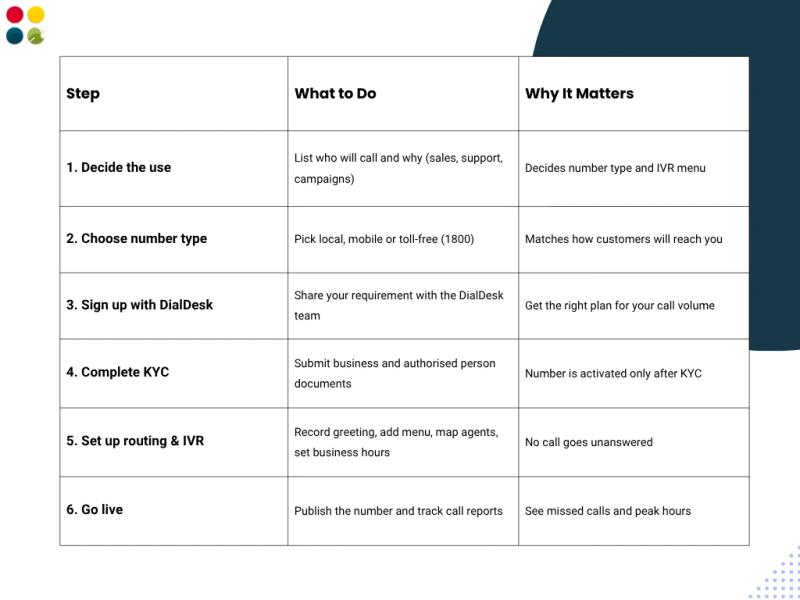
Step 1: Decide what the number is for
Write down who will call the number and why: sales enquiries, customer support, a marketing campaign or all of these. This decides the number type, how many agents it should ring and what your IVR menu needs.
Step 2: Choose the number type
Pick a local number for a city presence, a mobile number for sales and campaigns, or a toll-free number if you want customers to call at no cost.
Step 3: Sign up with DialDesk
With a DialDesk virtual number you get:
- Number types available (local, mobile, toll-free)
- IVR, call routing and business-hours rules
- Call recording and call analytics
- CRM and helpdesk integration
- Mobile and desktop apps for your team
- Clear monthly rental and per-minute pricing
- India-based support
Step 4: Complete KYC
DialDesk verifies your business before activating the number. See the documents list below.
Step 5: Set up call routing and IVR
Record a greeting, add menu options (for example, press 1 for sales and 2 for support), map each option to the right agents, and set business hours and after-hours routing so no call goes unanswered.
Step 6: Go live and track your calls
Publish the number on your website, ads and Google Business Profile. Use call reports to see call volume, missed calls and peak hours, and adjust routing as you grow.
What Documents Are Needed for a Virtual Number in India?
DialDesk verifies your business (KYC) before activating a virtual number. Keep these documents ready:
- Company PAN card
- GST certificate
- Certificate of Incorporation, Partnership Deed or Shop Act licence
- ID proof of the authorised person (Aadhaar or PAN)
- Address proof of the authorised person
- Authorisation letter on company letterhead
- Customer Application Form (CAF)
- Photograph of the authorised person
How Much Does a Virtual Number Cost in India?
Pricing usually has two parts: a monthly rental for the number and a per-minute charge for calls. With DialDesk:
- Local numbers: from ₹499/month
- Toll-free numbers: from ₹999/month, with 1,000 minutes included
- Per-minute rates: ₹0.40–1.50, depending on call type
Contact us for a quote based on your call volume.
Can You Keep Your Existing Business Number?
Yes. DialDesk supports porting of existing landline and mobile numbers. Porting takes 7–15 business days. You can start with a new virtual number on day one and use both numbers during the transition.
Virtual Number vs a Regular SIM or Landline
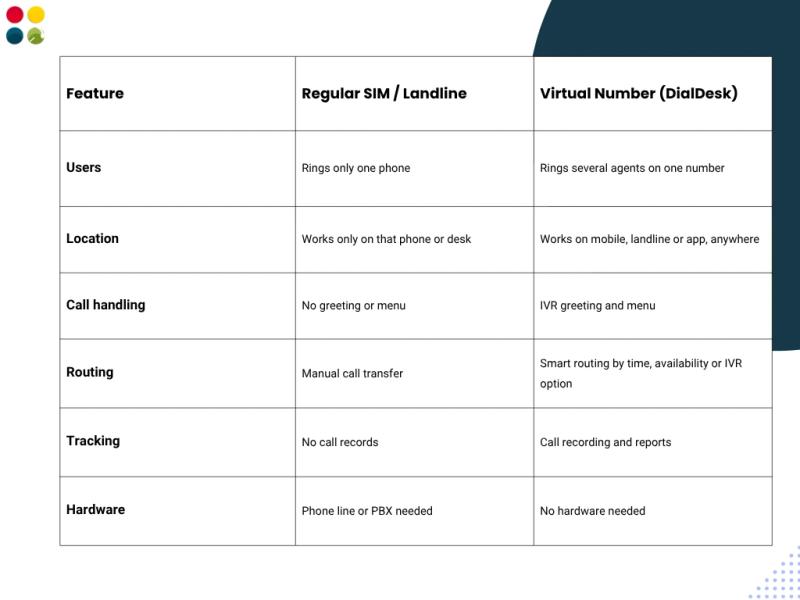
- Many users, one number: a virtual number can ring several agents; a SIM rings one phone.
- Works anywhere: calls reach your team on mobiles or apps, in the office or at home.
- Built-in tools: IVR, routing, recording and reports come with the number.
- No hardware: no PBX or desk phones to install.
Who Should Use a Virtual Phone Number?
- Startups and small businesses that want one professional number without hiring a receptionist or buying a phone system.
- E-commerce and D2C brands that handle order, delivery and return calls. See our e-commerce customer support.
- Healthcare providers that manage appointment and patient calls. See our healthcare call center services.
- Sales teams that run campaigns and want each call tracked.
- Remote and multi-city teams that need one number for staff in different locations.
Get a Virtual Number with DialDesk
DialDesk is a Noida-based contact center and cloud telephony company with 18+ years in customer support, 250+ clients, and ISO 9001:2015 and ISO/IEC 27001:2022 certification. Our virtual numbers come with IVR, smart call routing, call recording and call analytics, with same-day activation and no hardware.
If you also need trained agents and multichannel support, see our cloud contact center solutions.
Talk to our team to get your virtual number set up.