Call forwarding is a phone feature that automatically sends an incoming call from one number to another, such as your mobile, a colleague's phone or a support team. It means you never miss a call when you are busy, away or out of network. Mobile users turn it on with short codes, while businesses use a cloud phone number that forwards calls to the right person by rules.
Key Takeaways
- Call forwarding redirects incoming calls from one number to another.
- Main types: all calls, busy, no answer, unreachable, simultaneous, sequential and time-based.
- On most GSM mobiles, **21*number# forwards all calls and ##002# cancels forwarding.
- Businesses use cloud call forwarding to route one number to many agents, with recording and reports.
What Does Call Forwarding Mean?
Call forwarding (also called call diversion) means a call made to Number A rings on Number B instead. The caller dials the usual number and does not need to know where the call is answered. It is used by individuals who switch phones and by businesses that want every customer call answered.
How Does Call Forwarding Work?
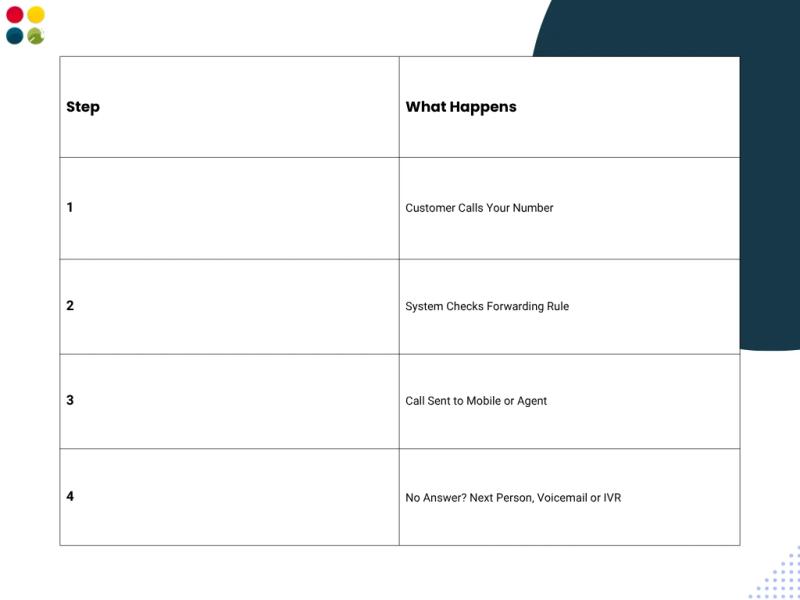
- A customer calls your number.
- The network or cloud system checks your forwarding rule (always, busy, no answer, time of day).
- The call is sent to the forwarding number, such as a mobile or an agent.
- If no one answers, the call can go to the next person, a voicemail or an IVR menu.
What Are the Types of Call Forwarding?
- Unconditional: every call is forwarded, without ringing your phone.
- When busy: calls are forwarded only when you are on another call.
- When not answered: calls are forwarded after a set number of rings.
- When unreachable: calls are forwarded when your phone is off or out of network.
- Simultaneous ring: several phones ring at once and the first to pick up gets the call.
- Sequential ring: phones ring one after another until someone answers.
- Time-based: calls go to different numbers by time of day, for example office hours vs after hours.
How to Activate Call Forwarding on a Mobile in India?
On most GSM networks, you can use these standard codes from your phone dialler. Codes can vary by operator, so check with your network if one does not work.
- Forward all calls: **21*number#
- Forward when busy: **67*number#
- Forward when not answered: **61*number#
- Forward when unreachable: **62*number#
- Cancel all forwarding: ##002#
You can also go to Phone > Settings > Calls > Call forwarding on Android or iPhone.
Mobile Call Forwarding vs Cloud Call Forwarding
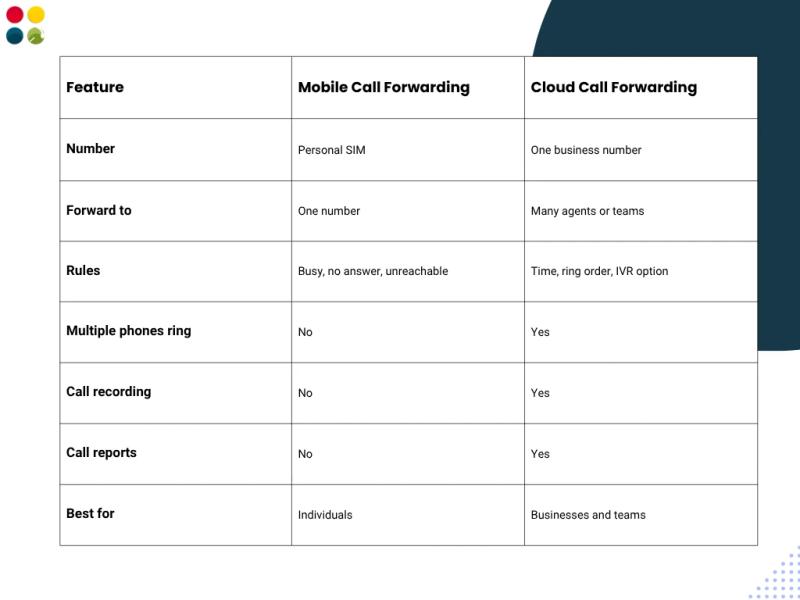
Mobile forwarding works well for one person. A business that gets calls from many customers needs more control: one number for the whole company, calls routed to many agents, and a record of every call. The table below shows the difference.
How Do Businesses Use Call Forwarding?
- Sales teams in the field: office calls ring on sales staff mobiles.
- After-hours support: calls go to an on-call person or an outsourced team at night.
- Remote and multi-city teams: one number reaches staff in any location.
- Overflow calls: when the in-house team is busy, extra calls go to a backup team.
- Startups and small businesses: a business number that rings on the founders' mobiles.
How to Set Up Business Call Forwarding with DialDesk
- Choose a business number: a virtual phone number or an 1800 toll-free number.
- Complete KYC. The number is activated the same day after KYC.
- Add the phones or mobiles of the people who should take calls.
- Set the routing rules: time of day, ring order, or an IVR menu so callers choose a team.
- Test the calls, then track them with call recording and reports.
How Much Does Business Call Forwarding Cost?
Business call forwarding runs on a cloud number. With DialDesk cloud telephony, a local number starts at ₹499/month and a toll-free number at ₹999/month with 1,000 minutes, with call rates from ₹0.40 to ₹1.50 per minute. For an exact quote for your setup, contact DialDesk.
Tips for Using Call Forwarding Well
- Always set a backup: if the first person does not answer, send the call to a second person or voicemail.
- Keep ring time short, around 15 to 20 seconds, before moving to the next person.
- Update numbers when staff change, so calls do not go to old phones.
- Check missed-call reports every week and call those customers back.
Get Call Forwarding with DialDesk
DialDesk has served 250+ companies over 18+ years. We set up your business number, call forwarding rules and IVR, and our team can also answer calls for you. Book a free demo and our team will get back to you within 4 business hours.