OVERVIEW
● In this blog, we’ll walk you through a simple, quick-start method to set up WhatsApp as a customer support tool in just 15 minutes.
● Whether you’re a growing startup, a D2C brand, or an enterprise exploring WhatsApp Support Solutions, this blog will show you why WhatsApp is critical for customer engagement today.
● Highlight the tools, compliance, and access before starting.
● Suggest step-by-step instructions to go live with WhatsApp support.
Introduction
In 2025, speed isn’t a luxury—it’s the expectation.
Customers don’t want to spend time on hold, download another app, or compose lengthy emails. They need assistance—right away, and in the medium they already consume daily. That’s where WhatsApp Support India excels.
WhatsApp is utilized by more than 2.7 billion individuals worldwide. From ordering to tracking delivery, from product information to feedback—customers are already messaging. It’s time your business was part of the conversation.
But the good news here is that implementing WhatsApp for customer care does not involve spending weeks on IT planning or breaking the bank. With the proper tools and strategic planning, you can go live in 15 minutes—ready to answer, automate, and interact.
Break it down step by step.
Why WhatsApp Support is the Future of CX?
80% of customers prefer messaging over traditional channels for support. — Meta Business Messaging Report, 2024
Benefits of WhatsApp Support Solutions
● 24/7 availability with auto-replies and bots
● Greater response rates compared to IVR or email
● Personalized care through user context and history
● Quicker resolution of issues by sharing media (voice, docs, images)
● Cost-efficient CX at scale
With 98% open rates and instant connectivity, WhatsApp unites business with consumer like never before.
What You Need to Get Started?
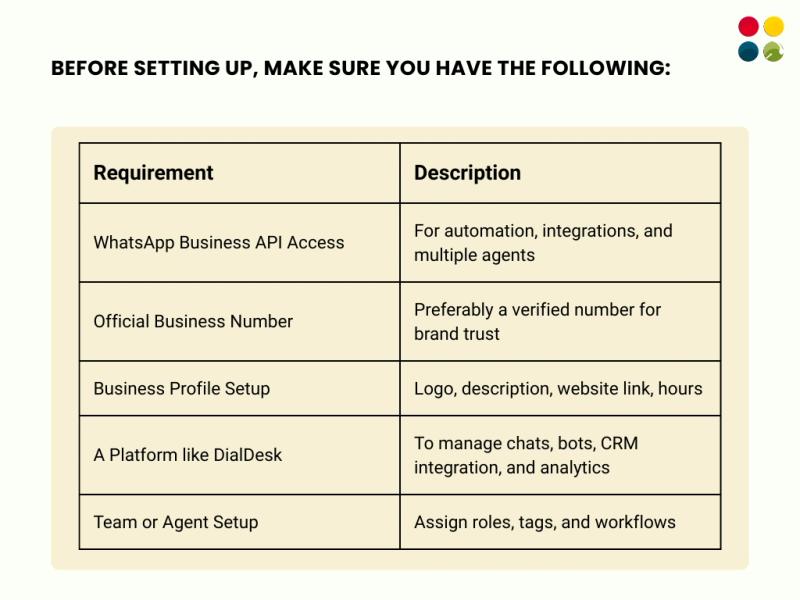
Step-by-Step Guide: Set Up WhatsApp Customer Support in 15 Minutes
Total Setup Time: ~15 Minutes, Let’s go!
Step 1: Apply for WhatsApp Business API Access (Time: 3 min)
● Visit Meta’s WhatsApp Business page
● Apply through a BSP (Business Solution Provider) like DialDesk
● Get verified through Facebook Business Manager
Step 2: Register Your Business Number (Time: 2 min)
● Use a dedicated phone number (not linked to existing personal WhatsApp)
● Set up SMS or voice verification
Step 3: Create Your Business Profile (Time: 2 min)
● Upload a logo
● Add business description, website, category, and support hours
Step 4: Integrate with DialDesk’s WhatsApp CX Engine (Time: 3 min)
● Connect your WhatsApp API to the DialDesk platform
● Use pre-built templates for welcome messages, order updates, or support flows
● Enable bot+human hybrid routing
Step 5: Set Up Auto-Replies & Routing Rules (Time: 2 min)
● Add FAQ bots for basic queries
● Use skill-based routing to assign complex queries to human agents
Step 6: Test & Go Live (Time: 3 min)
● Send test messages
● Monitor inbox
● Publish click-to-chat links on your website, social, or email
Expert Tip: Keep It Human. “Automate the basics, personalize the complex. Use bots for FAQs, but always offer a human fallback. That’s the sweet spot of modern WhatsApp support.” — CX Director, DialDesk
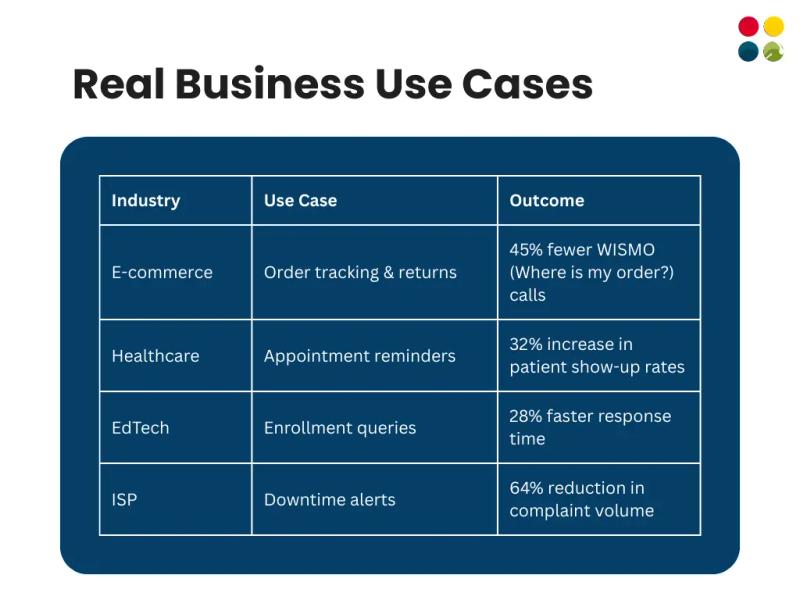
Real Business Use Cases
Thoughts to Ponder
● Are you where your customers are conversing, or making them come to you?
● Does your existing support channel feel like help—or a hassle?
● Can your team solve, not simply respond, via WhatsApp?
● What would it cost to NOT provide instant support in 2025?
Wrap-Up
Implementing WhatsApp Customer Support is not a month-long initiative. With the proper tools and attitude, it’s a 15-minute shift that can revolutionize the way your business talks.
From quicker resolution to anticipatory support, WhatsApp Support Solutions enable you to fulfill customer expectations—on their terms, in real-time.
Key Takeaways
● WhatsApp is now a CX necessity, not a nice-to-have
● Implementation with a platform like DialDesk is just 15 minutes
● Automation + human handoff = support that delights
● Use it for more than just queries—enable updates, sales, feedback
● It’s a low-cost, high-impact channel to scale support
Conclusion
Companies with Good Customer Service don’t begin when a customer calls you—it begins when they message you.
With WhatsApp Support Solutions, you’re no longer responding to issues—you’re responding, resolving, and creating loyalty in real-time. And when it only takes 15 minutes to go live, there’s no excuse not to.
Ready to Set Up WhatsApp Support in 15 Minutes?
DialDesk makes it effortless.
● Pre-approved WhatsApp templates
● Smart routing & hybrid support
● CRM, analytics, and KPI tracking
● Instant onboarding, no coding
Need a Head Start? Get your hands on our WhatsApp Customer Support Starter Kit—packed with setup checklists, response scripts, and best practices to launch support in minutes.
Start now with DialDesk – your plug-and-play CX growth engine.
Visit DialDesk.in | Get WhatsApp Support live now!