OVERVIEW
● In this blog, we will examine how any business can effortlessly implement a WhatsApp Help Desk without coding a single line. From the business advantages of WhatsApp support solutions to a step-by-step guide on how to begin with automation, integrations, and shared team inboxes—we have got it all covered.
● Whether you are a startup founder, support manager, or CX lead, this guide will equip you with sharp, actionable insights.
Introduction
There’s a reason your customers ignore your emails but react the moment a WhatsApp message hits their phone. Because WhatsApp isn’t simply a messaging app anymore—it’s where conversations turn into business.
Now, creating a robust support system isn’t just about speed anymore. It’s about convenience, familiarity, and availability. And surprise, surprise. You don’t need a technical team, dev tools, or enormous budgets to create a WhatsApp help desk that operates 24×7.
If you’re still switching between Excel sheets, missed calls, and email threads, this tutorial will guide you through the way you can reshape your customer experience with WhatsApp Help Desk Solutions—without coding a single line.
Why WhatsApp for Help Desk?
Let’s dissect with numbers:
● More than 2.78 billion monthly active users on WhatsApp globally(Statista, 2025)
● 98% open rates on WhatsApp messages vs. 20% for email (MobileSquared)
● 70% of consumers prefer to message instead of call for support (Zendesk CX Trends Report, 2024)
These statistics are not only staggering—they are a wake-up call for companies that depend on traditional channels of customer support.
The Power of No-Code WhatsApp Support Solutions
No-code platforms and cloud telephony vendors have made it achievable today to:
● Start a help desk
● Automate responses
● Assign tickets
● Monitor performance
all with zero coding expertise.
This makes support more democratic—not only for businesses, but also for small and medium-sized businesses, D2C brands, coaching firms, and local service providers.
Step-by-Step: How to Set Up a WhatsApp Help Desk Without Any Code
Here’s a step-by-step guide on how you can go live within a day:
1. Get Access to WhatsApp Business API
● This is not the same thing as the free WhatsApp Business app.
● Utilize a BSP such as DialDesk to register and verify your WhatsApp Help Center number.
● Select a display name, confirm your Facebook Business Manager, and obtain API access.
Pro Tip: Select a BSP that offers an easy-to-use dashboard for no-code automation.
2. Use a No-Code Platform for Your Help Desk
Platforms like DialDesk, Twilio Studio, Zoko, or WATI allow drag-and-drop workflows.
You can set up:
● FAQs & auto-replies
● Agent routing rules
● Business hours
● Auto-tagging (e.g., order-related, returns, complaints)
● Message templates
No code. No developer. Just flow and logic.
3. Create a Shared Team Inbox
No more WhatsApp Web logins on different devices.
Your support agents can:
● Collaborate on customer tickets
● Assign/resolve issues
● Respond in real time
● See previous conversation history
This single-viewing approach keeps confusion at bay and ensures better First Response Time (FRT) and First Call Resolution (FCR).
4. Integrate With CRM, E-commerce, or Ticketing Tools
Employ pre-built integrations or plug-ins:
● Shopify / WooCommerce – Order status, return updates
● Zoho / HubSpot – Sync contact details
● Freshdesk / Zendesk – Auto-ticket creation from chats
All without writing code.
Smart Integrations = Better Context = Happier Customers
5. Train Your Team and Set SLAs
The technology is ready, but your team requires training.
Utilize internal playbooks:
● Response time targets
● Tone of voice (friendly but professional)
● Escalation protocols
And continue monitoring team performance through analytics dashboards.
6. Automate Repetitive Tasks with Chatbots
Use AI-powered bots to respond:
● “Where is my order?”
● “I want to return my product.”
● “Can I speak to someone?”
Set up conditions such as:
● If user says “speak to agent” → Route to human
● If it’s post-business hours → Share working hours
Result: Save 30-50% of agent effort with automation.
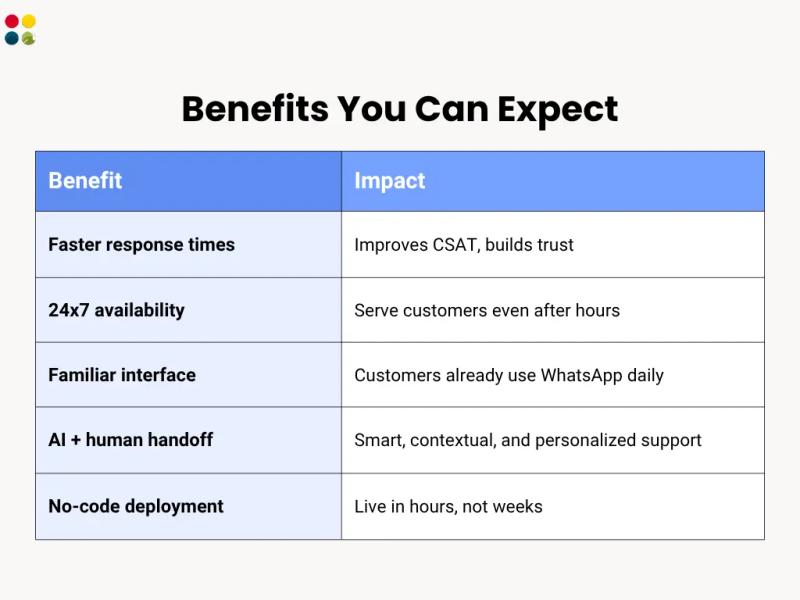
Benefits You Can Expect
Thoughts to Ponder
● If your customers are already on WhatsApp, why make them call or email?
● Why spend lakhs on coding-intensive tools when no-code ones are quicker and budget-friendly?
● Isn’t it time that your support system lived up to as smart as your marketing stack?
Wrap-Up
Creating a WhatsApp Help Desk Services without code is not a luxury anymore. It’s a business imperative—particularly where every delay of a minute = lost sales or lost trust.
The good news? You don’t have to revolutionize your current systems. You simply need to connect the dots using the right solution.
Let WhatsApp do the talking—literally.
Key Takeaways
● WhatsApp is now a full-scale support channel
● No-code platforms enable non-tech teams to go live fast
● Shared inbox, chatbot, CRM integration—code-free and available
● Enhances customer satisfaction and operational efficiency
● Cost-effective, scalable, and customer-centric
Also Read: Creating a Help Desk That Actually Helps
Conclusion
We’re transitioning from call centers to conversational support. In this transition, WhatsApp is not merely a channel—it’s a strategic differentiator.
You don’t require an IT department to go live with a 24×7 support desk. You need a solid plan, the right no-code tool, and a customer-centric attitude.
And that’s where DialDesk comes in.
Ready to Launch Your No-Code WhatsApp Help Desk?
DialDesk’s WhatsApp Support Solutions are designed for companies who want:
● Zero-code setup
● End-to-end automation
● Shared agent support
● Cost-effective, scalable CX
Talk to our team today and set up your WhatsApp Help Desk—live in 48 hours or less.
Schedule a demo now | Contact DialDesk