OVERVIEW
● This blog is designed to answer the Top 10 Frequently Asked Questions about setting up the WhatsApp Business API — a solution used by businesses of all sizes to deliver real-time, automated, and scalable customer support.
● From onboarding to compliance, costs, integration, and chatbot compatibility, we’ve covered every angle.
● Whether you’re a Tier 2 India startup or an international e-commerce company, this guide demystifies the technical speak and enables you to make intelligent CX choices.
Introduction
Today’s customer expectations are changing quicker than your typical app update. They don’t want to call, hold on, or sift through messages. They prefer instant, familiar, and mobile-first communication. And that’s where WhatsApp subtly reigns supreme in the conversation.
With more than 2.8 billion users worldwide and a 98% open rate (source: Statista, 2024), WhatsApp has evolved from being merely a messaging app. It’s an enablement platform for business—if implemented correctly.
But the catch is:
Most companies attempting to implement the WhatsApp API find themselves in a whirlpool of technical procedures, undefined price models, chatbot perplexity, and verification cycles. And that’s where this blog comes in to dispel that mist.
What you read below isn’t an instruction manual or a sales pitch—it’s the actual, human-first guide to setting up WhatsApp Support Solutions that are practical, scalable, and Indian and world business realities-compliant.
So, let’s crack the top 10 questions we’re asked at DialDesk, and likely the same ones on your mind today.
Top 10 FAQs for Setting Up WhatsApp API
1. What exactly is the WhatsApp Business API, and how is it different from the WhatsApp Business App?
Answer: The WhatsApp Business App is used by small businesses handling conversations on one device. The WhatsApp Business API is used by medium to large businesses that require:
● Automation of messages
● Utilizing multiple agents
● Integrating with CRMs, chatbots, and helpdesks
● Scaling CX using analytics and templates
Stat to Note: Companies leveraging the API have a 35% shorter resolution time compared to the old channels. (Meta Business Study, 2023)
2. Do I need a Facebook Business Manager account to access the API?
Answer: Yes. You need to verify your business on Meta’s Business Manager in order to access the API. This involves:
● Verifying your business information
● Connecting a phone number
● Submitting a display name
● Awaiting Meta’s approval
This is a one-off procedure, and it only allows compliant, authenticated brands to use WhatsApp for commerce.
3. What are the costs involved in setting up and using the WhatsApp API?
Answer: There are three types of costs to consider:
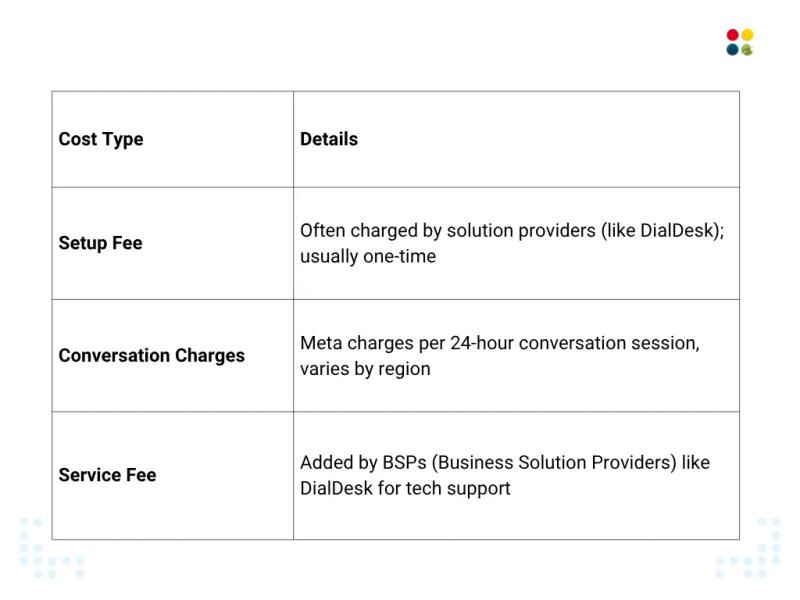
India Pricing (as of 2024): Roughly ₹0.40 to ₹0.90 per conversation depending on whether it’s marketing, utility, or service-related.
4. Is WhatsApp API secure and compliant with data protection laws?
Answer: Absolutely. WhatsApp Solutions employs end-to-end encryption, and Meta has robust compliance and data protection policies. But data storage, access, and integrations rely on your provider.
Pro Tip: Go for a provider like DialDesk that promises GDPR + Indian IT Act compliance and localized data hosting.
5. Can I integrate WhatsApp API with my CRM or helpdesk?
Answer: Yes, integration is one of the largest benefits. WhatsApp API can integrate with:
● CRM software such as Zoho, Salesforce, HubSpot
● Helpdesks such as Freshdesk or Zendesk
● Custom ERP systems with webhooks or REST APIs
Benefit: Unified dashboards for your agents = no tab switching = quicker resolution.
6. Do I need a developer to set up the WhatsApp API?
Answer: Not necessarily.
● If you’re utilizing a direct Meta API, yes, you’ll require dev assistance.
● But with a partner like DialDesk, you have a no-code interface, pre-made templates, CRM integrations, and agent dashboards. So you concentrate on CX, not coding.
7. Can I use chatbots with WhatsApp API?
Answer: Yes, and you should.
● Bots handle 60–80% of queries
● Perfect for FAQs, order tracking, scheduling, and opt-ins
● Human agents step in when necessary (smart escalation)
Ensure your bot adheres to Meta’s policy—no spamming, always get opt-in.
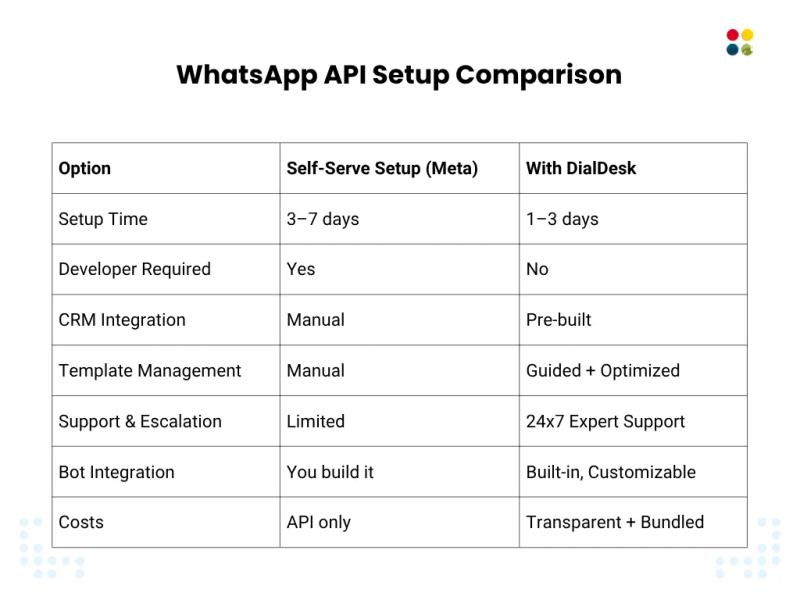
8. How long does it take to set up WhatsApp API?
Answer: It depends on how you do it.
● Self-setup via Meta: 3–7 days
● Via BSP like DialDesk: 1–3 working days with full support
If your business is already verified, the process is even faster.
9. What kind of templates can I send via WhatsApp API?
Answer: Templates are pre-approved messages used for outbound communication. They include:
● Order confirmations
● Appointment reminders
● Payment notifications
● Promo messages (with consent)
Templates must be submitted and approved by Meta. You can personalize them with variables like name, order ID, etc.
10. What are the limitations of the WhatsApp API?
Answer:
● No in-app voice/video calling
● Requires third-party BSP or dev team for setup
● Message templates require approval
● Broadcasts require opt-in
These limitations are in place for security and compliance, and can be worked around with the right WhatsApp Support partner.
WhatsApp API Setup Comparison
Thoughts to Ponder
● Are you using WhatsApp as a simple chat application, when it can be your biggest CX powerhouse?
● Do your customer support agents still switch tabs, while your customer waits for response?
● How many complaints or leads slip through your fingers because you didn’t implement WhatsApp Automation?
The difference between your existing system and what can be achieved with WhatsApp API could be the cause of customers jumping ship to your competitors.
Wrap-Up
The WhatsApp Business API is not merely another technology device—it’s how today’s businesses succeed at customer support. But as with all great tools, it requires intelligent setup, strategy, and support.
These FAQs are just the start. What you do next—automate, integrate, and grow—will determine if your CX is reactive or revolutionary.
Key Takeaways
● WhatsApp Business API is designed for businesses willing to automate and scale support.
● You require a validated business account, BSP partner, and compliance plan.
● It works with CRMs, bots, analytics tools, and makes CX seamless.
● Select a support partner that provides no-code setup, 24×7 support, and transparency.
Conclusion
Customers today want frictionless, real-time conversations—not cold emails or lengthy calls. WhatsApp is where they are. And with the right configuration, your brand can be there too—present, useful, and memorable.
From conversion to loyalty, WhatsApp API is not only a channel of communication—it’s a revenue channel.
Ready to Scale Your WhatsApp Support?
Let us do the heavy lifting.
We Provide:
● Verified WhatsApp API setup
● Built-in CRM & bot integrations
● Shared agent models for cost savings
● Proactive support, 24x7x365
Book a free demo today | Schedule your session