You can set up a cloud call center in about 72 hours because it needs no physical hardware, no PBX installation and no on-site IT work. You get business phone numbers, build IVR menus and call routing in a dashboard, add agent logins, test, and go live, all online.
Key Takeaways
- Traditional call center setup takes 2–4 weeks due to hardware procurement and on-site installation.
- A cloud call center removes hardware dependency, enabling a launch in about 72 hours.
- Number provisioning, IVR setup and agent onboarding all happen online through a dashboard.
- Fast setup lets businesses capture time-sensitive demand that slower competitors miss.
- DialDesk’s ISO-certified platform delivers speed without compromising reliability or security.
How Fast Can You Set Up a Cloud Call Center?
A cloud call center can be fully operational within about 72 hours. DialDesk provides phone numbers, IVR flows and agent logins entirely online, so a team can go from signup to answering live calls in about three days instead of the weeks a traditional setup demands.
Why Does a Traditional Call Center Setup Take Weeks?
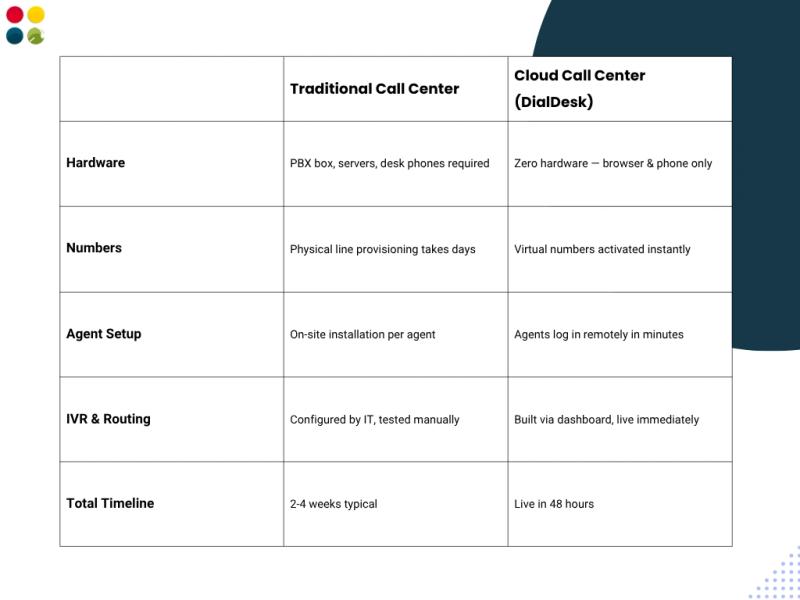
A traditional call center setup involves procuring PBX hardware, running cabling, installing desk phones, configuring servers, and waiting for IT to test every line. Each step adds days, and any hardware delay pushes the whole launch back further.
Businesses that need to launch fast, a new support line, a seasonal sales push, a disaster-recovery backup, can't wait weeks for a call center to become operational the traditional way. By the time hardware arrives, the opportunity may have passed.
A cloud call center removes every hardware dependency from the launch timeline. Numbers are provisioned instantly, IVR flows are built through a dashboard, and agents log in from a browser, collapsing weeks of setup into about 72 hours.
💡 Why It Matters
Businesses that can launch new support or sales lines within about 72 hours capture time-sensitive demand, such as seasonal spikes or urgent product launches, that slower competitors miss entirely.
What Do You Need to Set Up a Cloud Call Center?
Before you start, keep these ready:
- Business phone numbers, such as a virtual number or toll-free number, for customers to call.
- Your call flow: which menu options callers hear, in which languages (for example, Hindi and English), and which team each option reaches.
- A laptop or phone with a stable internet connection and a headset for each agent.
- Your CRM or customer data, if you want calls linked to customer records through a customer service CRM.
- A short training plan and call scripts for agents.
What Makes a Cloud Call Center Faster Than a Traditional Setup?
A cloud call center is faster to launch because every step happens online:
- Phone numbers are provisioned instantly, with no new phone lines to install.
- IVR and call routing are built through a dashboard, with no PBX hardware.
- Agents log in from a browser, with no desk phones, cabling or on-site IT setup.
What Are the Steps to Set Up a Cloud Call Center?
Setting up a cloud call center quickly comes down to removing every step that traditionally depends on physical hardware or on-site visits.
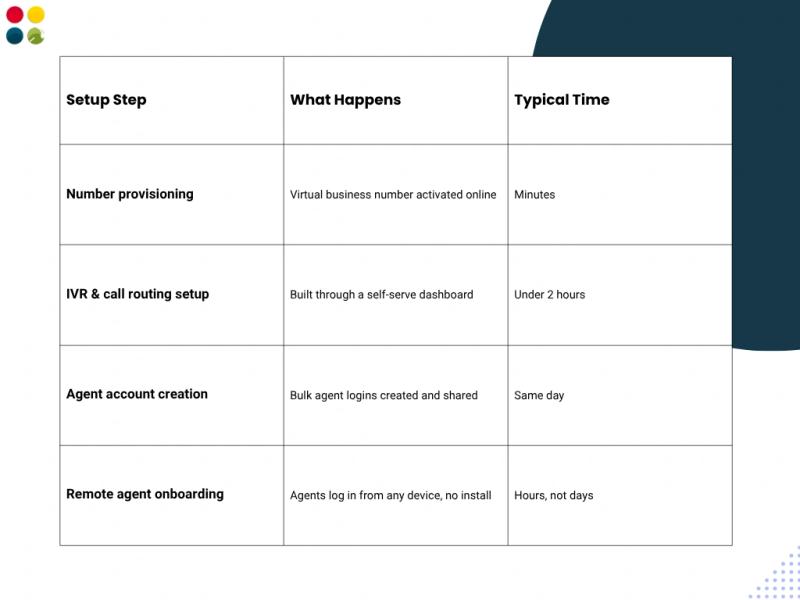
The setup steps in short:
- Get your business phone numbers.
- Build IVR menus and call routing in the dashboard.
- Create agent logins and onboard agents remotely.
- Test calls, recording and monitoring.
- Go live and start answering customer calls.
Within about 72 hours, a fully routed, recorded and monitored cloud call center is answering live calls — something a traditional setup couldn't achieve before week two.
Business Impact of a Cloud Call Center Launch
Businesses that launch on a cloud call center instead of a traditional setup see measurable time and cost advantages.
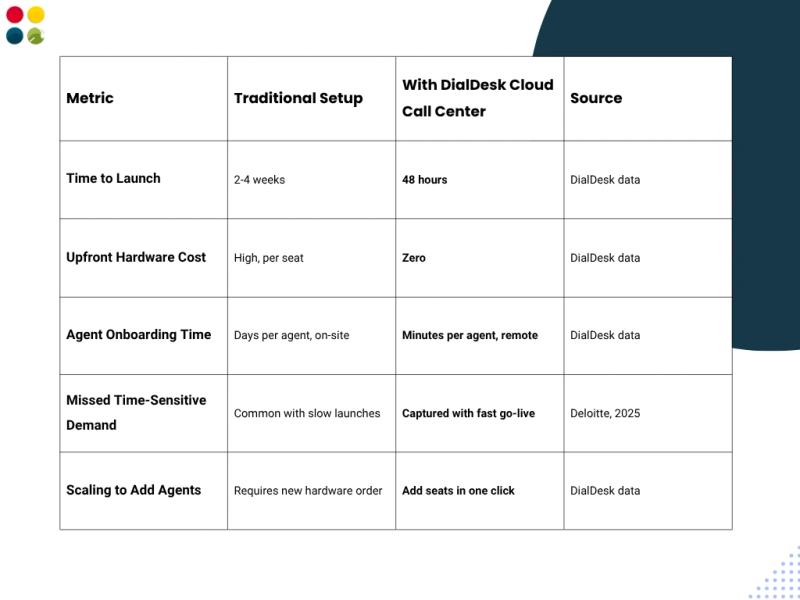
In short, a cloud launch cuts setup time from weeks to days and removes upfront hardware cost, so teams can start serving customers sooner.
✅ Trusted by 250+ Companies Across India
DialDesk’s cloud call center platform is ISO 9001:2015 and ISO/IEC 27001:2022 certified, a reliable infrastructure that goes live fast without compromising security. It works with your cloud telephony and WhatsApp support channels, so you can launch a complete communication system in about 72 hours.
Case study: Scaling Customer Support Across 600+ Cities with Cloud Contact Center Solutions
Is a Cloud Call Center Right for Your Business?
A cloud call center is the right choice if you need to start taking customer calls quickly, without buying hardware or waiting for IT installation.
It lets you get numbers, IVR and agent logins online, go live in about 72 hours, and scale up or down as call volumes change. Every week spent waiting on hardware is a week of missed calls, leads or seasonal demand.
To see how quickly your team could go live, book a demo below.