How Do You Integrate AI Support with a Traditional CRM?
Integrating AI Support with a Traditional CRM means connecting an AI-powered contact center platform to your existing CRM via API, native connector, or webhook — enabling bi-directional data sync so that AI-generated insights (sentiment scores, intent classification, call summaries, churn signals) flow into CRM records automatically, while CRM data (purchase history, account tier, open tickets) enriches the AI Support agent desktop in real time. The result: every agent has complete context. Every interaction generates structured intelligence. No data silo, no manual entry.
Why the AI Support and Traditional CRM Gap Is Costing You?
Your Traditional CRM holds years of structured customer data — purchase history, account notes, support tickets, and lifetime value scores. It is the institutional memory of every customer relationship your business has built.
AI Support holds real-time intelligence — live sentiment scoring, intent detection, escalation risk signals, and conversation summaries. It knows what is happening with customers right now, in the current interaction.
In most organisations, these two systems do not share data. AI Support insights stay locked inside the contact center platform. CRM data stays siloed in the sales or account management team. The result is a gap that emerges at the worst possible moment when a customer calls support, and the agent starts from scratch, with no CRM context and no AI enrichment.
💡 The Intelligence Gap
According to Salesforce (2025), 72% of customers expect agents to know their full history before the conversation starts. Yet 68% of contact centers report that agents regularly begin interactions without access to CRM data, creating the exact friction that AI Support integration is designed to eliminate.
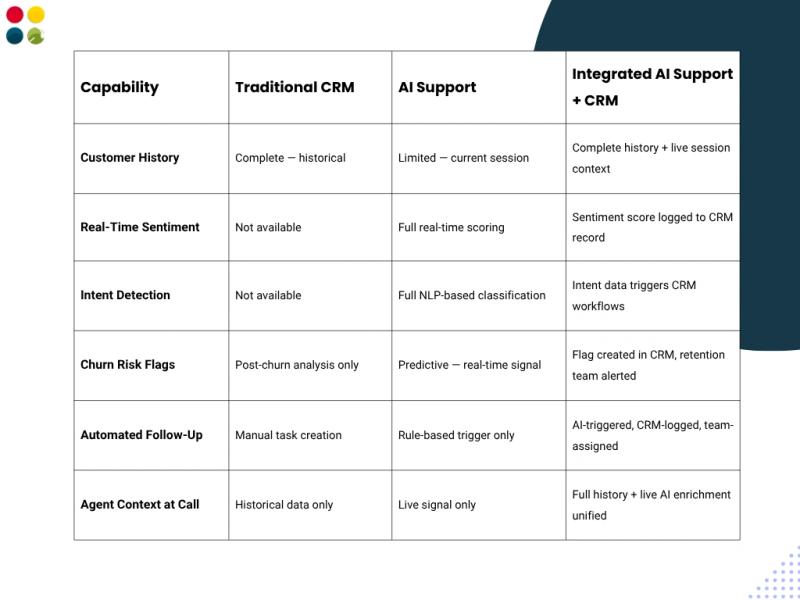
AI Support vs Traditional CRM vs Integrated: What Changes
How to Integrate AI Support with Traditional CRM: Step-by-Step
The integration of AI Support with a Traditional CRM follows a six-step process. Each step builds on the last, and skipping any one of them is the most common cause of underperforming integrations.
Step 1 — Map Your Current CRM Data Architecture
Before connecting systems, document exactly what data lives in your Traditional CRM contact record fields, interaction history schema, ticket fields, custom attributes, and workflow trigger logic. This mapping ensures that AI Support data lands in the correct CRM fields and does not create duplicate or conflicting records.
Step 2 — Define Integration Goals by Data Flow Direction
Clarify what you want agents to see in the AI Support desktop from the CRM (purchase history, account tier, open tickets), and what AI Support data should log back to CRM records (sentiment scores, call summaries, intent classification, churn flags). Defining these two directions prevents over-engineering and ensures the integration serves operational decisions — not just data completeness.
Step 3 — Select Your Integration Method
Three methods are available, each suited to different technical environments:
• API Integration — REST API for full bi-directional sync with any CRM that supports API connections (Salesforce, Zoho, HubSpot, Freshdesk, LeadSquared, custom builds).
• Native Connectors — Pre-built connectors for the most widely used CRM platforms, requiring minimal configuration and enabling integration within hours, not weeks.
• Webhook-Triggered Workflows — Real-time event-based triggers: when AI Support detects a churn signal, a webhook immediately creates a CRM task, updates the contact risk flag, and schedules a retention follow-up — without human intervention.
Step 4 — Configure Field Mapping and Sync Frequency
Map AI Support data fields — sentiment score, intent category, escalation flag, interaction summary to specific Traditional CRM fields. Define sync frequency by data type: real-time for churn signals and escalation flags; batch (end-of-call or hourly) for summaries and sentiment trend data.
Step 5 — Pilot with a Defined Agent Group
Run the integration with a cohort of 10–20 agents before full deployment. Validate that CRM data surfaces correctly in the AI Support desktop, that AI insights log accurately to CRM records, and that automated workflow triggers fire as expected. Define success metrics before the pilot begins — not after.
Step 6 — Activate Workflow Triggers and Monitor Integration Health
Configure Traditional CRM workflow rules that activate based on AI Support data retention team tasks triggered by churn flags, priority routing rules driven by account tier pulled from CRM, and escalation alerts for contacts with three or more interactions in seven days. Then implement integration health monitoring: data sync failure alerts, API rate limit dashboards, and monthly field-mapping audits.
Connect Your AI Support Platform to Your CRM — In Days
DialDesk integrates natively with Salesforce, Zoho, HubSpot, Freshdesk, LeadSquared, and 50+ CRM platforms. See the exact data flows, field mapping, and workflow triggers relevant to your stack.
[ Book Your Free Integration Demo → ]
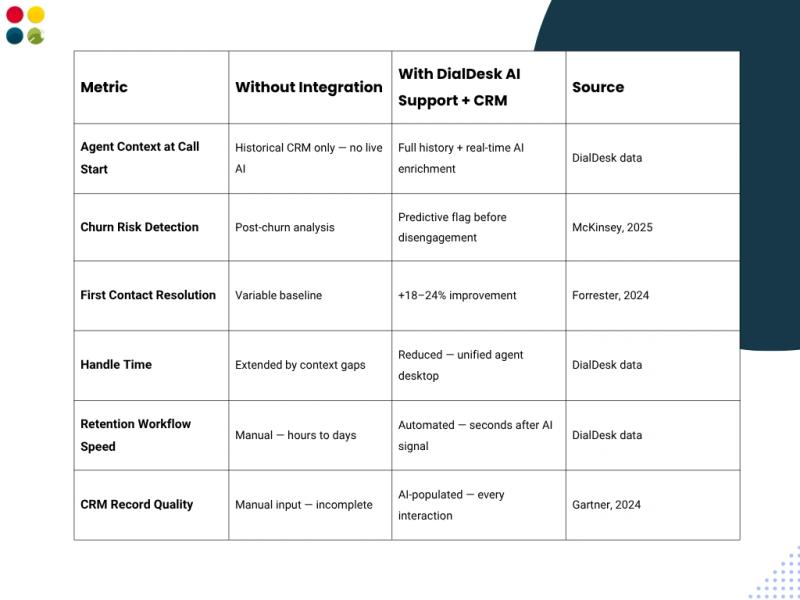
Business Impact: What AI Support and Traditional CRM Integration Delivers
Contact centers that complete the integration between AI Support and their Traditional CRM consistently report measurable operational improvements within 60–90 days of go-live:
✅ Trusted by 500+ Contact Centers Across India
DialDesk's AI Support platform integrates with 50+ CRM and helpdesk systems and is ISO 9001:2015 (Quality Management) and ISO 27001:2013 (Information Security) certified. Enterprise-grade AI Support integration built for India's contact center environment. See our full call center software India platform.
Key Takeaways
• AI Support and Traditional CRM integration enables bi-directional data flow — live AI insights appear in CRM records; historical CRM context enriches the AI Support agent desktop in real time.
• The six integration steps — data mapping, goal definition, method selection, field mapping, pilot, and workflow activation — must be followed in sequence for reliable results.
• Churn signals, sentiment trend data, escalation flags, and call summaries are the four highest-value data flows to prioritise in any AI Support to CRM integration.
• DialDesk supports API, native connector, and webhook-based integration across 50+ CRM platforms — including Salesforce, Zoho, HubSpot, Freshdesk, and LeadSquared.
• Integration health monitoring — sync failure alerts, API dashboards, and monthly audits — is as operationally critical as the initial technical configuration.
Conclusion
Your AI Support platform knows what is happening with customers right now. Your Traditional CRM knows what happened before. Integration connects those two timelines into a single, actionable view of every customer relationship, giving agents the context to resolve faster, and giving operations the intelligence to retain longer.
The integration is not a technology project with a completion date. It is an operational capability that compounds in value as more data flows between systems, more workflow triggers are activated, and more CRM records carry AI-enriched history.
Explore how DialDesk's AI Support platform connects with your IVR, call routing, and cloud telephony India infrastructure to deliver complete CRM-integrated AI intelligence from day one, no hardware required.
AI Support knows now. Traditional CRM knows beforehand. Integration means your agents know both every time.
📅 Ready to Connect AI Support with Your Traditional CRM?
DialDesk integrates with 50+ CRM platforms — delivering real-time AI intelligence into your existing CRM records and CRM context into every AI Support interaction. Join 500+ contact centers across India already running integrated AI Support.