OVERVIEW
- Growing support volume doesn't always mean you need a bigger support team. It may mean you need to automate the right work.
- AI ticketing can automate repetitive tasks such as ticket creation, categorization, routing, responses, summaries, and follow-ups.
- The biggest opportunity is not replacing support agents. It's giving them fewer repetitive tasks to deal with.
- Businesses can use AI ticketing to improve response times, increase agent productivity, and manage higher ticket volumes more efficiently.
- A 40% reduction in help desk costs is possible in some operations, but actual savings depend on ticket volume, automation coverage, workflows, and existing support costs.
What Is AI Ticketing?
AI ticketing is the use of artificial intelligence to automate and assist with everyday help desk tasks, from understanding an incoming customer request to categorizing, routing, responding to, and summarizing the ticket.
It helps support teams spend less time managing tickets and more time actually solving customer problems.
Think about the last time you contacted a support team.
Maybe you wanted to know where your order was.
Maybe you needed to reset your password.
Maybe you wanted to check a refund status.
These aren't necessarily difficult questions. But when hundreds or thousands of customers ask similar questions every day, they consume a surprising amount of agent time.
That's where AI ticketing comes in.
Instead of asking an agent to manually read, categorize, assign, respond to, and close every ticket, AI can take care of much of that repetitive work.
The agent can then step in when the situation actually needs human judgment.
And that's an important distinction.
AI ticketing isn't about removing humans from customer support. It's about removing unnecessary work from humans.
Why Does Help Desk Support Get So Expensive?
Help Desk Support becomes expensive when ticket volume grows faster than your team's ability to handle it efficiently.
Businesses often respond by hiring more agents, adding shifts, or outsourcing support.
But if a large percentage of tickets are repetitive, increasing headcount isn't always the most efficient solution.
Consider a typical retail business during a festive sale.
Before the sale, the support team might comfortably handle its normal ticket volume.
Then the sale starts.
Suddenly, customers are asking:
- Where is my order?
- Can I change my delivery address?
- How do I return this product?
- When will my refund arrive?
- Is this product still available?
- Why was my payment declined?
The support queue grows.
Agents start answering the same questions repeatedly.
Response times increase.
Customers send follow-ups because they haven't received an answer.
And the business starts thinking:
"We need more agents."
But here's the thing:
You may not have a people problem.
You may have a repetitive-work problem.
If your agents are spending a large part of their day answering questions that follow predictable patterns, AI ticketing can take some of that workload off their plate.
How Can AI Ticketing Reduce Help Desk Costs?
AI ticketing can reduce help desk costs by automating repetitive support work, improving agent productivity, reducing handling time, and helping teams manage more tickets without increasing headcount at the same rate.
There isn't one magic feature that creates the savings.
It's the combination of several small improvements across the support workflow.
1. Automate repetitive questions
If customers repeatedly ask the same questions, there's little value in making an agent type the same answer hundreds of times.
AI can handle common requests using your approved knowledge base and support information.
That gives agents more time for complicated conversations.
2. Automatically categorize tickets
A customer shouldn't have to wait while an agent figures out whether their request belongs to billing, technical support, delivery, or returns.
AI can analyze the request and identify its intent.
For example: "My payment went through but my order isn't showing."
The system can recognize this as a payment/order-related issue and route it accordingly.
3. Route tickets to the right team
Sending a ticket to the wrong department creates unnecessary delays.
The ticket gets transferred.
The customer waits.
Another agent reads the entire conversation.
AI-assisted routing can help get the request to the right team sooner.
4. Give agents a head start
Not every ticket should be completely automated.
Sometimes the customer needs a human.
That's where AI can support the agent instead.
It can summarize the conversation, surface relevant information, suggest a response, or highlight the customer's previous interactions.
The agent doesn't have to start from zero.
5. Automate follow-ups
Some tickets don't require another conversation with an agent—they simply require the right follow-up at the right time.
AI-powered workflows can help automate status updates, reminders, and other routine follow-ups.
That means fewer tickets sitting in the queue waiting for someone to remember them.
What Can AI Automate in a Help Desk?
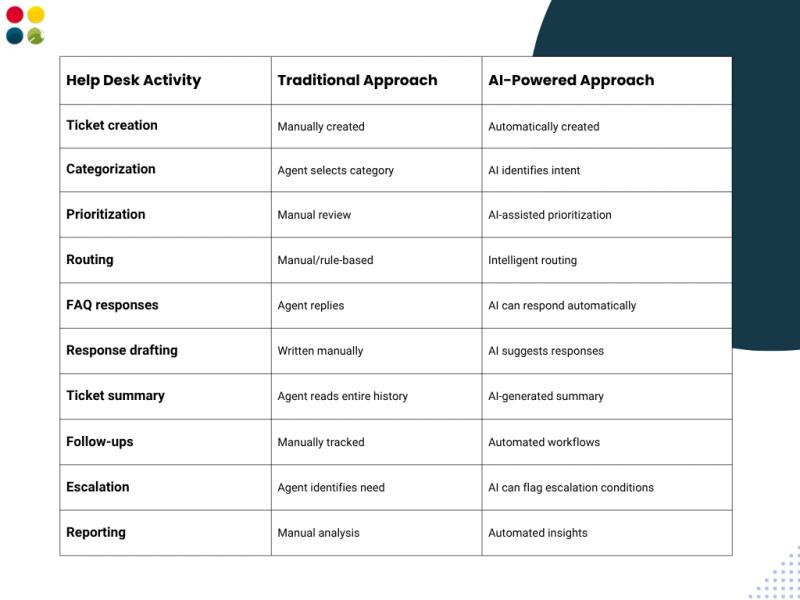
AI can automate many of the repetitive steps involved in handling a support ticket, including classification, prioritization, routing, response generation, summarization, and follow-ups.
The exact level of automation depends on the business, its workflows, and the AI Help Desk Software being used.
Here's what that can look like:
The key is knowing what should be automated and what shouldn't.
A customer asking for an order status?
Probably a good automation candidate.
A customer dealing with a complicated billing dispute?
Probably better with a human.
A frustrated customer with a sensitive complaint?
Definitely give them a clear path to a person.
Good AI ticketing doesn't blindly automate everything.
It knows when to step back.
AI Ticketing vs. Traditional Help Desk Software
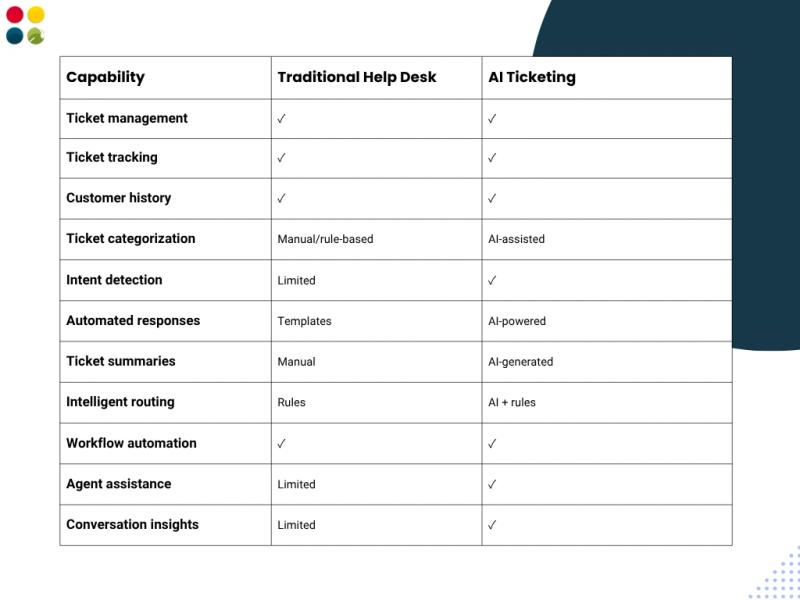
Traditional help desk software is designed primarily to organize, track, and manage customer requests.
AI ticketing adds an intelligence layer that can understand customer intent, automate repetitive work, and assist agents throughout the ticket lifecycle.
That difference matters.
A traditional help desk might tell you:
"You have 1,250 open tickets."
An AI-powered help desk can go a step further and help answer:
"What are these tickets about?"
"Which ones are urgent?"
"Which ones can be automated?"
"Which team should handle them?"
"What is the customer asking for?"
"What should the agent respond to?"
The ticket is no longer just a record in a system.
It becomes a source of actionable information.
Can AI Ticketing Really Reduce Costs by 40%?
It can, but 40% should not be treated as a guaranteed saving for every business.
The actual impact depends on how much of your support workload is repetitive, how much automation you implement, your current staffing costs, ticket volume, average handling time, and how efficiently your workflows are designed.
For example, imagine a company handling 10,000 support tickets every month.
If a significant portion of those tickets involves repetitive questions, there is an opportunity to automate part of the workload.
But cost reduction doesn't necessarily mean:
"Fire 40% of your support team."
That's not the right way to think about it.
Instead, consider what happens when your existing team can handle more work without constantly adding people.
Your business might be able to:
- Handle seasonal spikes without hiring temporary agents
- Reduce overtime
- Resolve tickets faster
- Reduce average handling time
- Increase tickets handled per agent
- Reduce unnecessary escalations
- Provide support outside traditional working hours
- Reallocate agents to higher-value customer conversations
This is why cost per resolved ticket can be a more useful metric than simply looking at the number of support employees.
A Simple Example
Suppose your team spends 10 minutes handling a repetitive ticket.
Now imagine AI reduces the manual work involved to just 2–3 minutes of agent involvement.
The customer still gets an answer.
The agent still has oversight when required.
But the amount of human time invested in that ticket has changed dramatically.
Multiply that across thousands of tickets, and the operational impact can become significant.
How Should You Implement AI Ticketing?
Start with the work that is repetitive, predictable, and high-volume. Don't try to automate your entire help desk on day one. Identify the biggest sources of manual effort, automate those workflows first, measure the results, and then expand.
Step 1: Look at your existing tickets
Before buying or implementing anything, understand what's actually happening in your support queue.
Find out:
- What questions appear most often?
- Which tickets take the longest?
- Which requests are transferred between teams?
- Which tickets generate the most follow-ups?
- What are agents spending most of their time on?
Your existing ticket data will tell you where the biggest opportunity is.
Step 2: Start with high-volume, low-complexity requests
Look for tickets such as:
- Order status
- Password resets
- Refund status
- Shipping information
- Product FAQs
- Account information
- Appointment confirmations
These are usually easier to automate than complex complaints or unusual cases.
Step 3: Give AI reliable information
AI is only as useful as the information it has access to.
Make sure your knowledge base is:
- Accurate
- Up to date
- Easy to understand
- Consistent with your actual policies
You don't want AI confidently giving customers outdated information.
Step 4: Create a human escalation path
Automation shouldn't become a wall between the customer and your support team.
If AI can't resolve the issue, the customer should be able to reach a human without having to start the entire conversation again.
Step 5: Measure what changes
Don't measure success simply by asking:
"How many tickets did AI answer?"
Look at the bigger picture.
Track:
- Cost per ticket
- Average handling time
- First response time
- Resolution time
- First-contact resolution
- Automation rate
- Agent productivity
- Escalation rate
- Customer satisfaction
That's where you'll see whether the investment is actually working.
What Should You Look for in AI Help Desk Software?
The best AI help desk software should combine ticket management with automation, customer context, agent assistance, analytics, and human handoff. Don't choose a platform simply because it offers an AI chatbot or AI-generated replies. Look at how deeply AI is integrated into the entire support workflow.
Here are some capabilities worth evaluating.
AI Capabilities
Look for:
- Intent detection
- Ticket classification
- Automated responses
- Response suggestions
- Conversation summaries
- Sentiment detection
- Intelligent routing
Workflow Automation
Your help desk should also make it easy to automate:
- Ticket assignments
- Escalations
- Notifications
- Follow-ups
- SLA alerts
- Status updates
Agent Assistance
AI should make agents better—not just make customers talk to a bot.
Useful features include:
- Customer history
- AI-generated summaries
- Suggested responses
- Knowledge-base recommendations
- Conversation context
- Easy human handoff
Analytics
Your support dashboard should help you understand what's actually happening.
For example:
Which issues create the most tickets?
Which issues could be automated?
Where are customers waiting the longest?
Which workflows cause unnecessary escalations?
How much workload is AI handling?
These insights can help you improve the support operation over time.
What Does Good AI-Powered Help Desk Support Look Like?
Good AI-powered help desk support doesn't feel like automation for the sake of automation. It feels faster, simpler, and more relevant to the customer.
The customer gets a quick answer when the issue is straightforward and a smooth handoff to a human when the issue requires judgment.
Imagine two support experiences.
Experience 1
Customer submits a request.
↓
The ticket enters a generic queue.
↓
The agent reads it.
↓
The agent categorizes it.
↓
The agent searches for information.
↓
The agent writes a response.
↓
Customer replies.
↓
The agent reads the entire conversation again.
↓
The ticket is finally resolved.
Experience 2
Customer submits a request.
↓
AI understands the request.
↓
Tickets are categorized and routed.
↓
Relevant information has surfaced.
↓
AI handles the simple request or prepares the agent.
↓
The agent steps in when needed.
↓
The customer gets a faster resolution.
That's the difference businesses should be looking for.
Not more automation. Better support operations.
The Future of Help Desk Support Is Hybrid
There is a tendency to frame AI in customer support as a choice: AI or humans?
But that's the wrong question. The better question is:
What should AI handle, and where should humans step in?
AI is exceptionally useful for repetitive, predictable tasks.
Humans are still better suited for empathy, judgment, negotiation, complex problem-solving, and situations that don't fit neatly into a predefined workflow.
The strongest support teams will combine both.
AI handles the repetitive workload.
Agents handle the moments that matter.
And customers get the best of both.
How Can DialDesk Help?
At DialDesk, we look at Customer Support Help Desk as more than a ticket queue.
The goal is to help businesses manage customer conversations more efficiently—without forcing every interaction into the same automated journey.
With the right combination of automation and human support, businesses can reduce repetitive workloads, give agents better context, and respond to customers faster.
Whether you're dealing with a seasonal spike, growing ticket volumes, or an overloaded support team, the first step is understanding where your team's time is actually going.
Because sometimes, the answer isn't hiring more people.
It's giving your existing team fewer repetitive things to do.
Final Takeaway
The goal of AI ticketing isn't to make your help desk less human.
It's to make your human team less busy with work that doesn't need a human.
When AI takes care of repetitive requests, ticket sorting, routine responses, summaries, and follow-ups, your agents have more time for the conversations where their experience actually matters.
That's where the real opportunity lies.
Not in replacing your support team.
In helping your support team do more with the time they already have.