OVERVIEW
1. In this blog, we will walk you through the WhatsApp Cloud API, its feature set, the differences with its on-premise counterpart, benefits for businesses, and how you can integrate it into your workflows of customer communications seamlessly.
2. We’ll also discuss the effect of WhatsApp Chat Support, provide tips from experts, present real-life use cases, and discuss some statistics that reflect its increasing prominence.
3. Whether you’re a startup, SME, or enterprise, this guide is intended to provide you with the clarity you require to confidently adopt and utilize the WhatsApp API.
Introduction
WhatsApp is no longer a messaging app, but a communication behemoth. With more than 2.78 billion active users globally (Statista, 2024), it’s where your customers are already spending their time. But as more companies realize the value of connecting with their customers where they’re already spending their time, WhatsApp has introduced an even more robust solution: the WhatsApp Cloud API.
Designed to scale, ease deployment, and reduce infrastructure expenses, the WhatsApp Cloud API gives businesses of any size access to Meta’s secure servers, without the need for on-premise hosting. From real-time customer support to targeted marketing, this tool is becoming a foundation in digital communication strategies.
Let’s dive into how you can leverage this WhatsApp API to revolutionize the way your business engages with its audience.
What is WhatsApp Cloud API?
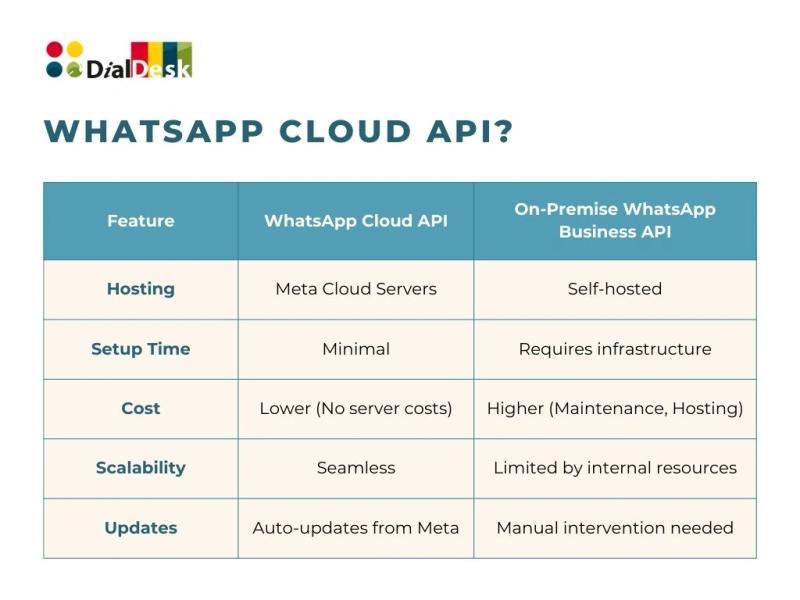
WhatsApp Cloud API is a cloud-hosted variant of the WhatsApp Business API built by Meta. While the on-premise API forces businesses to host their servers, the Cloud API is hosted by Meta’s infrastructure, providing quicker setup, scalability, and lower IT complexity.
Key Use Cases:
1. Automated customer support through WhatsApp Chat Support
2. Sending notifications (shipping updates, payment reminders)
3. Lead qualification and routing
4. CRM integration for personalized interaction
Why Businesses are Adopting WhatsApp Cloud API?
Here’s why the WhatsApp API—particularly its cloud variant—is picking up huge momentum:
1. Instant, Personalized Conversations
More than 69% of customers report feeling more confident about brands that provide support through messaging platforms.
With WhatsApp Chat Support, businesses can:
a. Provide real-time support
b. Cut wait times
c. Provide personalized product suggestions
2. Easy Integration with CRM and Automation Tools
No matter if you’re using HubSpot, Salesforce, or homegrown tools, the WhatsApp Cloud API enables you to:
a. Sync contact information
b. Monitor conversation history
c. Automate follow-ups based on customer behavior
3. Secure, Compliant, and Scalable
Meta provides end-to-end encryption, GDPR compliance, and security best practices. And because it’s cloud-hosted, you don’t have to worry about scaling as your business scales.
4. Multichannel, Omnichannel Readiness
Combine the Cloud API with other digital channels (email, SMS, IVR, webchat) for a completely omnichannel customer experience, guaranteeing seamless conversation flow no matter the touchpoint.
WhatsApp Chat Support: A Game Changer for CX
Customer Experience (CX) is no longer a luxury—it’s a brand differentiator. With WhatsApp Chat Support, businesses are witnessing:
1. 30-40% greater engagement rates compared to emails
2. Up to 60% reduction in resolution times
3. Improved customer satisfaction scores (CSAT)
Real-World Example: A top FMCG brand, which used DialDesk’s WhatsApp solution, registered a 55% improvement in customer retention within 90 days, merely by providing proactive chat support and reminders on WhatsApp.
Setting Up the WhatsApp Cloud API
Here’s a simplified step-by-step for businesses planning to implement the WhatsApp Cloud API:
Step 1: Create a Meta Business Account
a) Register on Meta for Developers
b) Verify your business
Step 2: Get a Verified Phone Number
Choose a dedicated number for your WhatsApp Business
Step 3: Generate API Credentials
Use Meta’s developer console to access your API Key, phone ID, and WhatsApp Business ID
Step 4: Connect via a Business Solution Provider (BSP)
BSPs like DialDesk offer low-code/no-code integrations, templates, and AI-powered automation to get started in hours, not days.
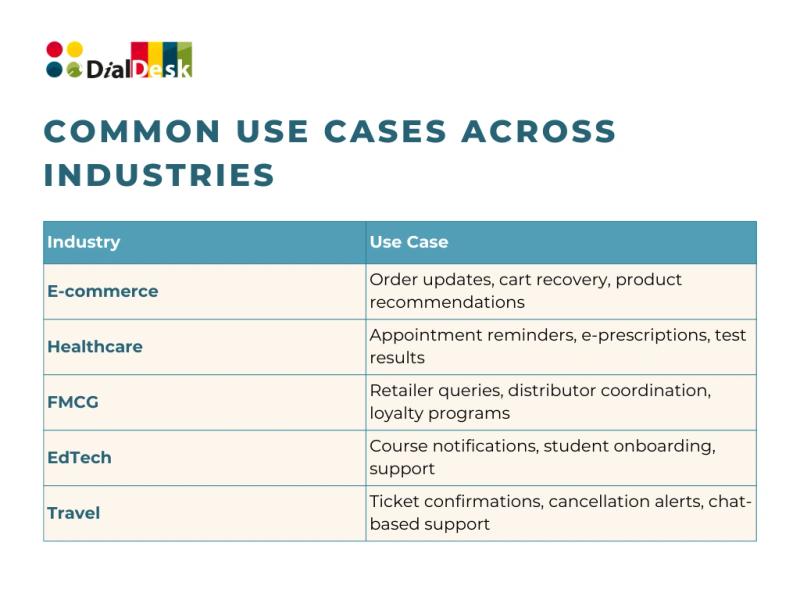
Common Use Cases Across Industries
Expert Tips for Maximizing WhatsApp API Impact
1. Don’t spam. Use session messages responsibly and follow permitted templates beyond the 24-hour frame.
2. Localize to attract and engage locals. Translated replies raise credibility and trust.
3. Globalized reach grows trust & conversion rates.
4. Auto-Respond sensibly. Reserve AI bots for mundane queries and human transfer for complex inquiries.
5. Monitor & track. Use open rates, clicks, & reply time measurement to optimize messaging flow.
Thoughts to Ponder
1. Are you still using old channels such as email for customer support, despite your customers being active on WhatsApp?
2. How much are slow responses costing your brand in lost revenue and trust?
3. Can your existing support system cope with the volume and expectations of a digital-first audience?
Wrap Up
The WhatsApp Cloud API is not just a technological boost—it’s a business strategy for companies willing to take their customer interactions, support overheads, and brand loyalty to the next level. With it, you’re not only reaching customers where they’re at—you’re communicating their language in the moment, and forming lasting connections.
Whether scaling up support, automating sales, or just beginning your WhatsApp Chat Support journey, the Cloud API provides a future-proof foundation for your business communication stack.
Key Takeaways
1. WhatsApp Cloud API is easy to integrate and scales seamlessly.
2. It’s ideal for providing instant, secure, and customized chat support.
3. Ideal for companies of any size looking for cost-effective digital transformation.
4. DialDesk provides out-of-the-box solutions that reduce setup time significantly.
Ready to Level Up Your WhatsApp Chat Support?
With DialDesk’s WhatsApp Cloud API Integration, you receive:
1. AI-powered automation
2. Smooth onboarding
3. CRM and payment gateway integrations
4. Real-time support dashboard and analytics