OVERVIEW
The WhatsApp Business API is a powerful communication tool that enables medium and large businesses to automate and manage customer interactions at scale. This guide walks through the step-by-step setup process, explores its benefits for automation, integration, and marketing, and highlights best practices for compliance and performance. By leveraging platforms like DialDesk, companies can enhance customer engagement, streamline support, and deliver superior customer experience management that builds long-term loyalty.
Introduction
In today’s customer-first digital landscape, timely and personalized communication is essential. WhatsApp, with over 2 billion active users, has become the go-to channel for businesses that want to engage customers efficiently.
However, traditional WhatsApp and the WhatsApp Business App have significant limitations—manual replies, single-user access, and no integration capabilities. That’s where the WhatsApp Business API changes the game.
This step-by-step guide explains how to use the API to automate communication, scale operations, and create better customer experiences. If you want to understand the broader role of digital interaction in shaping satisfaction, explore what is customer experience management.
What is the WhatsApp Business API?
The WhatsApp Business API is an official solution developed by Meta that allows medium and large businesses to automate and manage WhatsApp communication at scale. Unlike the WhatsApp mobile app, it connects directly to your systems through a Business Solution Provider (BSP) such as DialDesk, WATI, or Interakt.
You can find a detailed technical explanation in the WhatsApp Business API Documentation.
Difference Between WhatsApp, Business App, and API
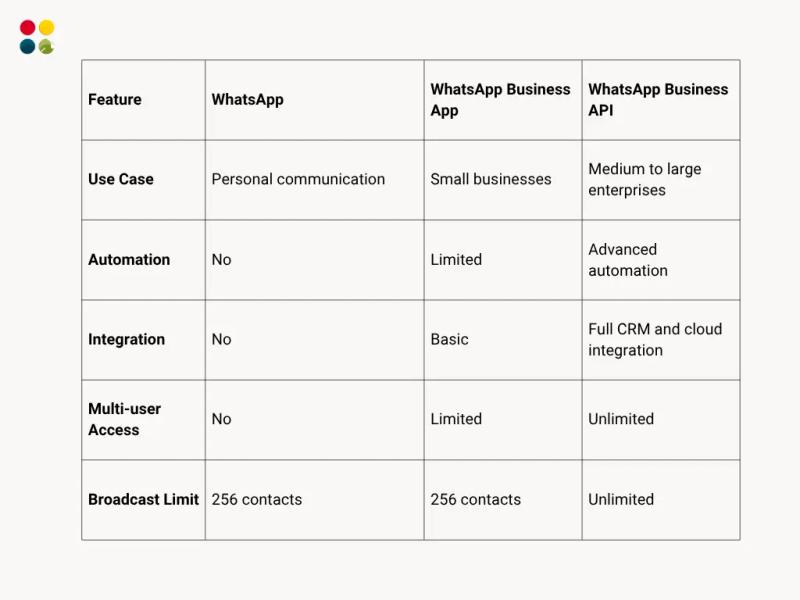
With the API, businesses can automate responses, manage multiple agents, and send thousands of messages daily—all from one integrated platform.
Why Businesses Use WhatsApp Business API?
The API offers unmatched capabilities for customer engagement, support, and retention.
1. Automation and Scalability – Automate FAQs, appointment reminders, or order confirmations, and handle large-scale customer communication effortlessly.
2. Real-Time Support – Ensure customers receive prompt replies through automated workflows or chatbots, even during non-business hours.
3. Marketing and Customer Retention – Send personalized product updates, limited-time offers, and re-engagement campaigns that convert.
4. Seamless Integration – Integrate WhatsApp with CRMs, eCommerce platforms, or support software like DialDesk to manage all communication in one dashboard. You can also enhance post-chat support processes using WhatsApp Support systems for improved responsiveness.
How to Use WhatsApp Business API: Step-by-Step Setup Guide
Step 1: Create and Verify Your Meta Business Account
1. Go to Meta Business Manager.
2. Add your business name, details, and website.
3. Verify your business identity through official documentation.
This verification ensures your business profile is recognized by Meta.
Step 2: Choose a Business Solution Provider (BSP)
A BSP simplifies the technical setup and provides access to API features through an easy-to-use dashboard.
Providers like DialDesk, Interakt, and WATI are Meta-approved and offer automation tools, reporting, and integrations. DialDesk, for example, provides a plug-and-play WhatsApp integration that connects seamlessly with your customer service and sales systems.
Step 3: Register and Verify Your Phone Number
Use a new number that isn’t already linked to a WhatsApp account. Verification is done through your BSP dashboard, after which the number becomes your official business contact.
Step 4: Configure Messaging Tools
● Set up message templates for transactional and promotional notifications.
● Design chatbot flows for FAQs and routing.
● Connect with your CRM or helpdesk system to centralize interactions.
For improving customer support response, explore Best Practices for Handling Dispatch Calls Effectively—it complements this setup by optimizing team communication workflows.
Step 5: Go Live and Start Messaging
Once verified, your WhatsApp Business API is ready to go live. Start engaging with customers, sending automated updates, and running marketing campaigns.
WhatsApp Business API Pricing Explained
While access to the API is free, charges apply per message and vary by region and message category.
Message Types:
● Utility Messages: Transactional updates like order confirmations.
● Marketing Messages: Campaign and promotional notifications.
● Service Messages: Customer service interactions.
● Authentication Messages: One-time passwords and verification codes.
Choosing a transparent BSP like DialDesk ensures cost-effective pricing without hidden fees.
Compliance and Best Practices
Following Meta’s communication policies is essential for maintaining trust and compliance.
● Get Customer Consent: Always obtain customer opt-in before sending business messages.
● Manage Message Frequency: Avoid over-messaging. Keep communications relevant, personalized, and value-driven.
● Maintain Data Privacy: Ensure compliance with local data protection laws and display clear privacy and opt-out policies.
● Use Approved Message Templates: All message templates must be reviewed and approved by Meta to ensure quality and compliance.
To understand how engagement impacts satisfaction, businesses should learn how to measure customer experience.
Use Cases: How Businesses Are Leveraging the WhatsApp API
● E-commerce: Send product updates, abandoned cart reminders, and shipping alerts.
● Healthcare: Automate appointment reminders and follow-ups.
● Education: Share admission updates, schedules, and course notifications.
● Financial Services: Deliver real-time loan, EMI, and transaction updates.
For businesses focused on scaling their sales processes, this resource—How to Implement Sales as a Service: A Step-by-Step Guide—is an excellent complement to WhatsApp-based engagement strategies.
Pro Tips to Maximize WhatsApp API Efficiency
● Combine chatbots with live agent escalation for a balanced experience.
● Track performance metrics like response rates and customer satisfaction.
● Test message templates to optimize open and response rates.
● Integrate WhatsApp with other channels like voice and email for unified communication.
For inspiration on top-performing customer service solutions, review Best Customer Service Companies in 2025—it highlights the industry leaders setting new standards for service excellence.
Conclusion
The WhatsApp Business API is not just a messaging tool—it’s a comprehensive communication solution. From automating workflows to integrating with CRM systems, it empowers businesses to deliver faster, more personalized experiences at scale.
With a provider like DialDesk, setup becomes effortless. You can integrate WhatsApp with your customer engagement ecosystem, streamline operations, and provide 24/7 assistance without additional hiring or technical complexity.
Ready to transform your customer communication with WhatsApp Business API? Partner with DialDesk—a trusted customer engagement platform that unifies WhatsApp automation, cloud telephony, and real-time analytics under one system.
Book a Free Demo | Talk to an Expert