OVERVIEW
● Here in this blog, we will discuss how companies can strategically leverage WhatsApp Business, particularly the WhatsApp API, to enhance customer experience throughout the entire customer journey.
● Break down why WhatsApp is the default platform for CX.
● Emphasize key features and advantages of WhatsApp API.
● Reveals how WhatsApp Chat Support fuels real-time satisfaction.
Introduction
How we communicate with customers is no longer about convenience — it’s about connection.
In a world where speed, personalization, and simplicity are not negotiable, companies must go to customers where they already are. For more than 2 billion individuals, that is WhatsApp.
From monitoring deliveries to fixing problems in minutes, WhatsApp Business has evolved into an experience channel—not a chat app. Particularly with the WhatsApp Customer Care, companies can create real-time, automated, and scalable support systems without sacrificing the human touch.
If you’re still depending solely on emails or traditional IVRs, this blog is your nudge to level up.
Why WhatsApp for Customer Experience?
Let’s start with the why.
● 2.78 billion+ monthly users globally (Statista, 2024)
● 98% open rate for WhatsApp messages (Meta for Business, 2024)
● 40% cost reduction in support when WhatsApp is used with automation (Gartner)
Customers crave answers at the moment. They prefer chat to calls. They crave simplicity. WhatsApp checks all those boxes—and more.
Whether pre-sale questions, post-sale assistance, or even loyalty engagement, WhatsApp Chat Support facilitates smooth two-way conversation that feels personal, quick, and secure.
Key Features of WhatsApp Business API That Boost CX
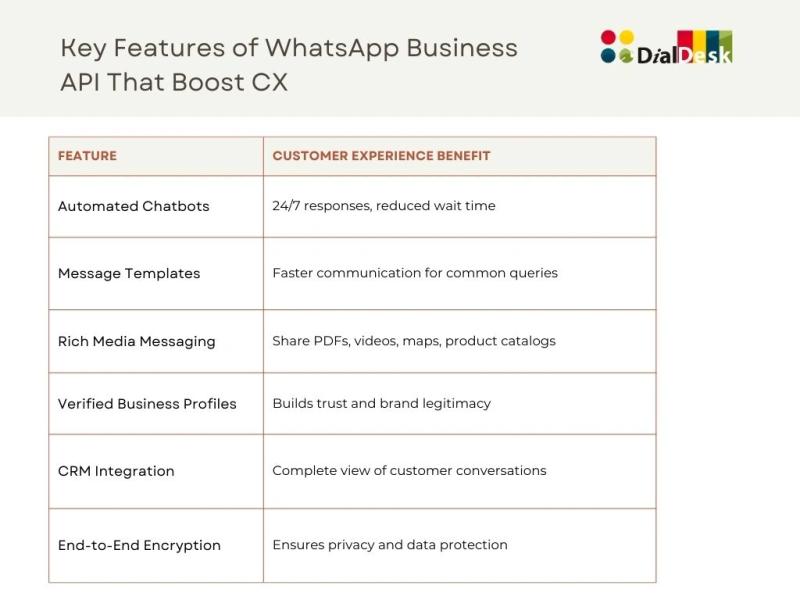
The WhatsApp API allows all of this at scale, especially when integrated with platforms like Salesforce, Zoho, HubSpot, or DialDesk.
Strategies to Optimize CX with WhatsApp Business
1. Automate FAQs and Ticket Creation
Your agents’ time is precious. Leverage chatbots running on WhatsApp API to automate recurring questions—shipping information, refund policy, appointment scheduling—allowing your agents to handle tricky issues.
Pro Tip: Integrate chatbot workflows directly with your ticketing tool (such as DialDesk) so escalations are seamless and trackable.
2. Offer Instant Post-Purchase Updates
Nothing conveys “we care” better than proactive communication. Leverage message templates to inform customers of their order status, shipping delays, or returns.
● Minimize inbound questions
● Keep customers informed
● Establish brand credibility
3. Enable Click-to-Chat from Social Media or Website
Make it simple for customers to contact you. Add WhatsApp “click-to-chat” buttons on:
● Product pages
● Instagram/Facebook ads
● Landing pages
● Customer portal
It eliminates friction and encourages more interaction.
4. Hyper-Personalize Interactions
With CRM integration, your agents are able to view purchase history, location, and past queries—conversations become smarter and more customized.
Stat: Personalized customer experiences result in 20% higher customer satisfaction scores (McKinsey, 2024)
5. Support in Multiple Languages
If you’re catering to a global or multilingual local customer base, WhatsApp API supports localization with language-specific flows, bots, or human agents. The aim is: don’t let language hinder service.
6. Blend Bots + Human Support Seamlessly
Smart routing is the trick. Begin with automation, then if the customer requires more assistance, escalate to a live agent—without changing platforms.
Hybrid workflows where agents and bots collaborate are made possible by tools such as DialDesk.
7. Use Data & Analytics to Improve
Utilize analytics dashboards to monitor:
● Response time
● Bot success rate
● Common issues
● Customer satisfaction (CSAT)
Optimize your workflows according to actual usage data — this makes Customer Experience proactive and no longer reactive.
Real-World Use Cases Across Industries
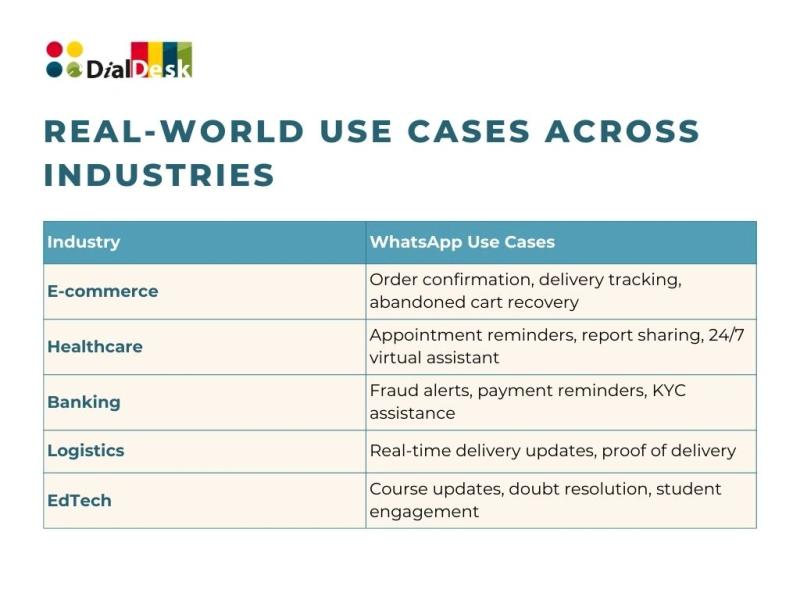
Each of these can be powered by WhatsApp Chat Support and enhanced with WhatsApp API capabilities.
Thoughts to Ponder
● Are your customers getting delayed responses just because you’re not on their preferred platform?
● How much time could your agents save if FAQs were automated via chatbot?
● What if a single WhatsApp conversation could convert, close, and support—without switching apps?
Wrap Up
Optimizing customer experience is no longer optional—it’s your competitive advantage. With WhatsApp API and Chat Support, businesses can create fast, personalized, secure communication channels that customers love.
From reducing support costs to increasing engagement and loyalty, WhatsApp is more than messaging—it’s a CX strategy.
Key Takeaways
● WhatsApp API facilitates automated, scalable, and secure messaging
● WhatsApp Chat Support enables faster, more personalized service
● Adding WhatsApp Solutions to your CX can result in 3x greater engagement
● Works best when paired with CRM, AI bots, and data analytics
● Works across industries—retail, healthcare, finance, education, and more
Start Your WhatsApp CX Journey with DialDesk
We don’t merely offer WhatsApp API access at DialDesk—we craft experiences.
● Custom chatbot configuration
● CRM, helpdesk, and analytics integration
● End-to-end onboarding and training
● Secure, scalable, and compliant implementation
Ready to meet your customers where they are?
Book your free consultation now or email us at ispark@dialdesk.in