OVERVIEW
● Efficiency is not only a desire in the fast-paced digital age of today—it’s a necessity. Voice to text technology is transforming the way businesses, students, and professionals deal with communication and documentation.
● In this blog, we’ll discuss how a Voice to Text Translator operates, its real-world applications, conversion tips for accuracy, and why it’s becoming a productivity must-have in 2025.
Introduction
Your voice is strong—it projects ideas, tales, and choices. But to type all of that? Exhausting, time-wasting, and error-prone. Step in Voice to Text Translators—Artificial Intelligence-enabled software that takes spoken words and turns them into text in a fraction of a second.
It’s not only about convenience. Grand View Research estimates that the global speech recognition market will be worth $27.16 billion by 2026, with a CAGR of 17.2% (source). From corporate meetings to lecture halls, from medical documentation to producing content on-the-go, voice-to-text technologies are revolutionizing productivity.
Here in this blog, we’re not going to overwhelm you with technical mumbo-jumbo. Rather, we’ll walk you through the useful insights, doable tips, and actual applications of voice-to-text technology, such that you can easily grasp and utilize this tool irrespective of whether you’re a content writer, student, or business professional.
What is Voice to Text Translator?
A Voice to Text Translator is an AI-powered software that converts your spoken words into written text. It’s the bridge between speech and text, enabling faster communication, accurate documentation, and hands-free operation.
Key Features:
● Real-time transcription: Converts speech to text instantly
● Multi-language support: Supports 50+ languages in advanced tools
● Punctuation and formatting: Some AI tools automatically add punctuation
● Integration capabilities: Works with apps like Zoom, Google Docs, WhatsApp
How to Convert Voice to Text: Step-by-Step
Transcription voice to text can be a tech-sounding process, but today’s tools make How to Convert Voice to Text delightfully easy:
1. Select a good Voice to Text Translator – AI-driven software such as DialDesk, Google Speech-to-Text, or Otter.ai
2. Establish language settings – Maintain precise translation and transcription
3. Record with clarity – Speak at a consistent pace, leave no background noise
4. Apply editing features – Automatically check generated text for mistakes
5. Export and incorporate – Copy text to docs, CRM, or messaging platforms
Real-Life Applications
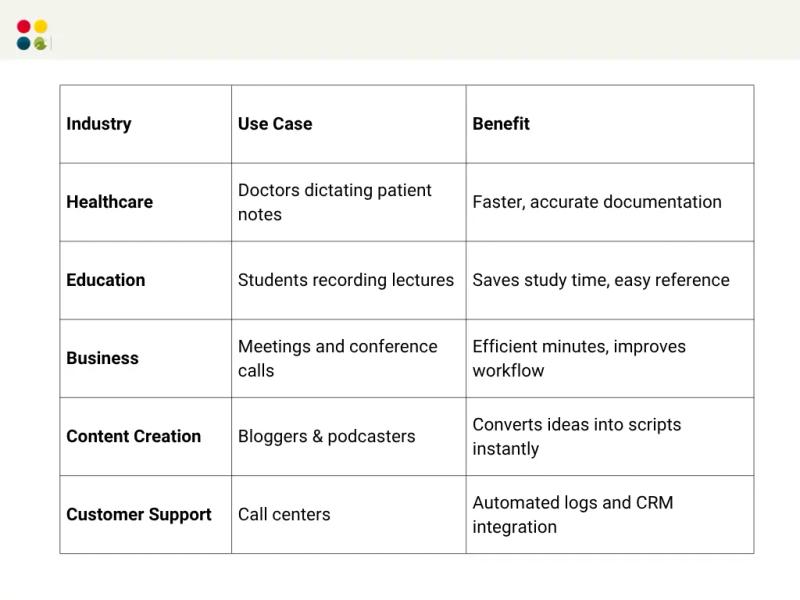
Statistics to Keep in Mind
● 77% of business professionals think that voice-to-text technology enhances productivity (source: TechJury 2024)
● Companies using speech recognition software document operations 25-30% quicker (source: Forbes 2023)
● Voice search will comprise 50% of all searches online by 2025, which means that transcription tools are vital to content strategy (source: ComScore)
Tips for Maximum Accuracy
1. Utilize good-quality microphones
2. Don’t get multiple speakers overlapping
3. Speak normally, not too quickly
4. Train your AI device on industry-specific vocabulary
5. Update BPO Call Center Software regularly
Thoughts to Ponder
● Would your company save hundreds of hours every month by adding voice-to-text?
● Are your content workflows primed to take full advantage of AI transcription?
● How can multilingual transcription unlock new markets for your products?
Key Takeaways
● Voice to Text Translators save time and effort.
● They enhance accuracy and accessibility across industries.
● AI Transcription tools are more and more reliable, with 95%+ accuracy.
● Integration into workflows can increase productivity by 25-30%.
● Selecting the correct tool and adhering to best practices is vital to success.
Wrap Up
Voice to text translation isn’t only a tech fad—it’s a must-have productivity solution for today’s businesses and professionals. From recording meetings, generating content, or offering customer support, accurate voice-to-text aids save time and improve efficiency in communications.
Join the AI revolution, save time, and let technology do the typing.
Supercharge your workflow? Try DialDesk’s AI Voice to Text Translator today and see productivity shoot through the roof.