OVERVIEW
This guide explores how to convert voice recordings into accurate text using AI-powered tools—a key step in modernizing customer service, improving team productivity, and extracting insights at scale.
We’ll cover:
● Why transcription matters in customer service
● Use cases across support, training, quality, and compliance
● A step-by-step walkthrough for converting voice to text
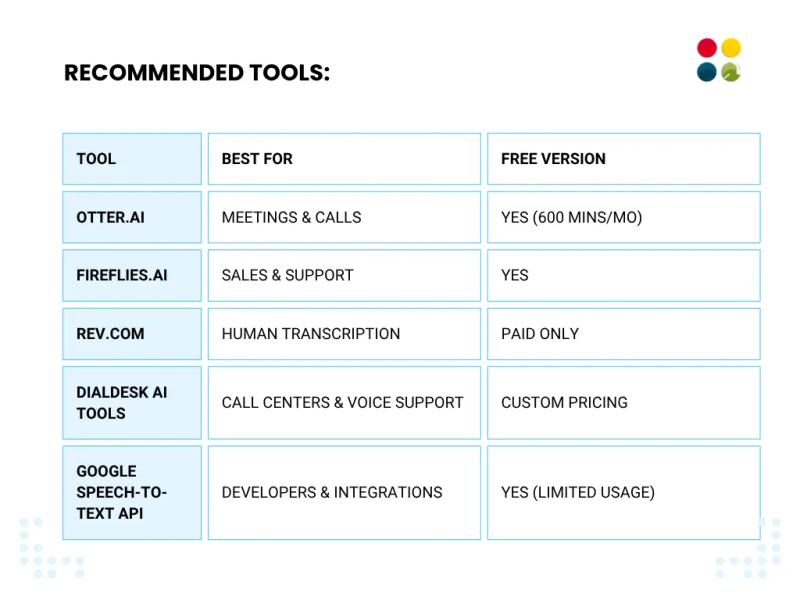
● Recommended tools (free & paid) for businesses
● Common mistakes and how to avoid them
● Industry trends, expert takes, and real-world stats
Whether you’re a startup, SMB, or enterprise—if your business relies on customer conversations, this blog is for you.
Introduction: Conversations Are Gold—If You Can Capture Them Right
All businesses converse with customers.
Some hear better than others.
But few know what to do when the conversation is over.
Here’s what is broken in a lot of customer service configurations today:
● Calls are accepted, but not recorded.
● Recordings are captured, but not scrutinized.
● Profitable insights? Lost in gigabytes of sound.
Voice-to-text transcription fills that divide.
It makes every word that is spoken searchable, readable, and usable information.
And with AI customer service, it’s no longer just possible—it’s instant, accurate, and accessible.
From agent training to customer feedback mining, Voice Recording to Text is no longer a backend process—it’s a business intelligence play.
Why Transcription Matters in Customer Service?
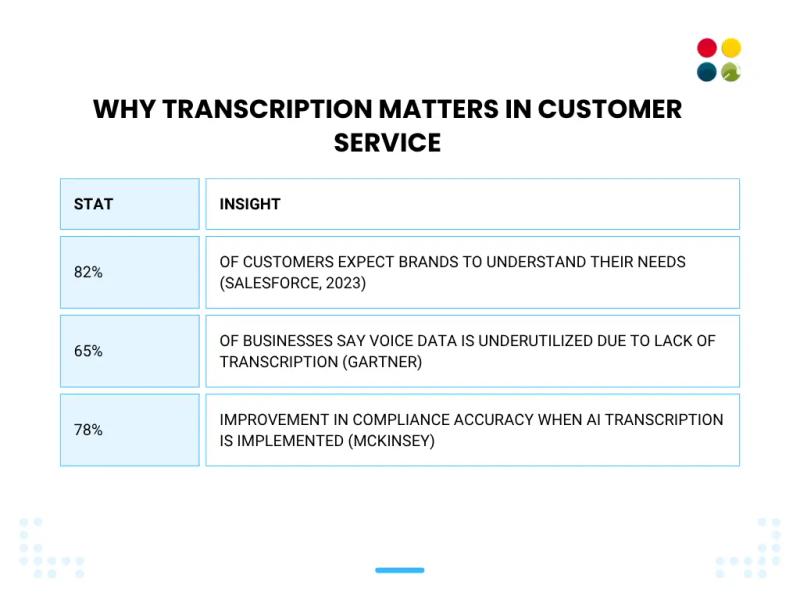
Convert Voice Recording to Text is the first step in:
● Understanding patterns
● Detecting customer sentiment
● Training agents better
● Automating post-call follow-ups
● Staying compliant in regulated sectors
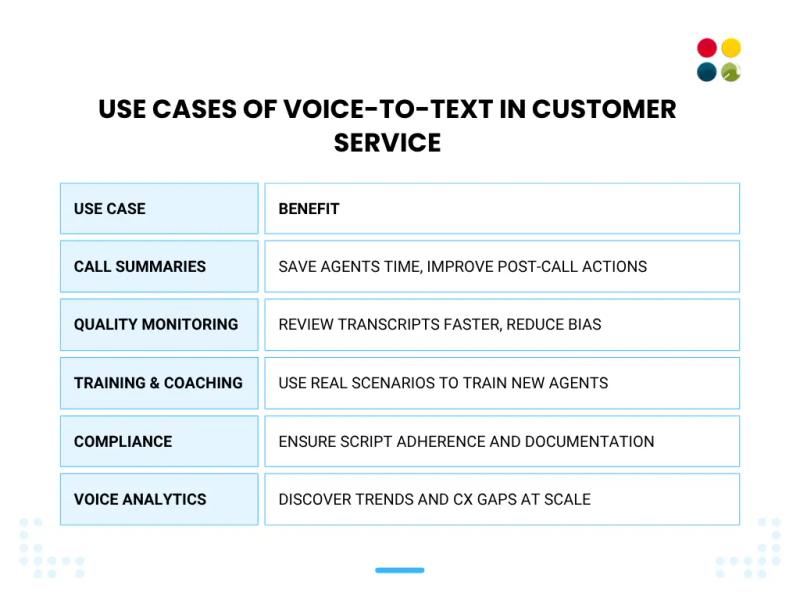
Use Cases of Voice-to-Text in Customer Service
Step-by-Step Guide: How to Convert Voice Recording to Text
Step 1: Choose the Right Tool
Step 2: Upload or Record Your Audio
● Ensure your audio is noise-reduced, high-quality, and clear
● Accepted formats: MP3, WAV, M4A, MP4 (depending on the tool)
● You also have the option to record live calls or meetings through integrations (Zoom, Google Meet, DialDesk)
Step 3: AI Processing Begins
● Your audio goes through AI speech recognition by the tool
● Within seconds to minutes, you have an unprocessed transcript
● Most tools include speaker detection, time stamps, and searching
Step 4: Clean & Format (Optional but Smart)
● Edit speaker tags (e.g., Customer, Agent)
● Highlight keywords or intents
● Export to DOCX, TXT, SRT, or integrate with your Customer Service CRM
Step 5: Put the Text to Work
● Upload into your CRM or Helpdesk
● Tag for feedback loops, escalation tracking, or keyword alerts
● Use transcripts in training, email follow-ups, or internal audits
Real-World Example
Small D2C beauty brand leveraging AI transcription through DialDesk:
● Reduced manual call summaries by 90%
● Utilized transcripts to determine the most common product complaints
● Rewritten call scripts → 17% increase in CSAT
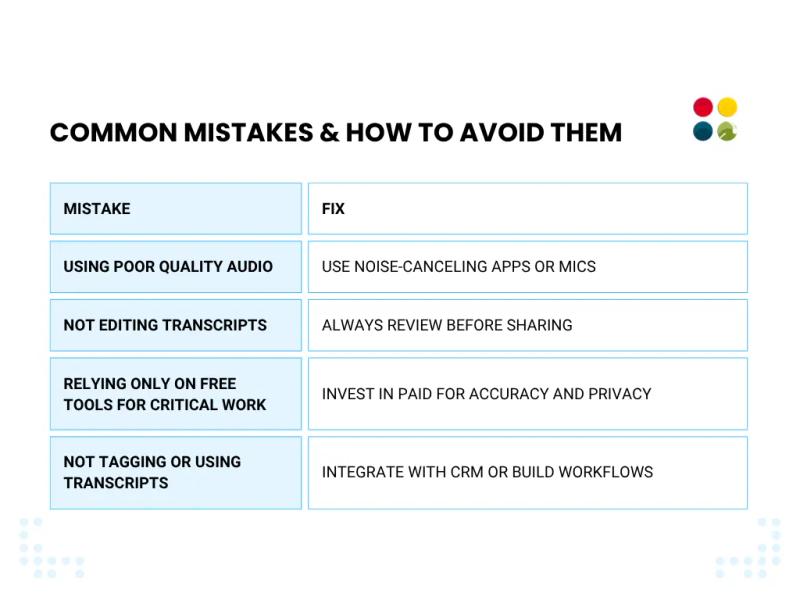
Common Mistakes & How to Avoid Them
Thoughts to Ponder
● Are your call recordings making you listen better or merely occupying storage?
● What would you learn if you transcribed 100 of your most recent customer calls?
● Can improved transcription shorten your complaint resolution time or enhance your NPS?
● Is your team leveraging voice data like an asset—or leaving it on the table?
Wrap Up
In a customer-centric world, listening more is a strategy.
And transcription is the bedrock of listening at scale.
By Online Voice to Text Converter with AI tools, you’re not merely noting down calls—you’re unleashing intelligence, consistency, and accountability.
Whether you’re a solo entrepreneur running customer support or a call center manager training 50 reps, voice-to-text AI is a low-effort, high-impact solution.
Key Takeaways
● Transcription turns sloppy audio into clean, actionable information
● AI technology today provides real-time, cost-effective transcription
● Use cases range from training, compliance, and quality to customer insights
● Small teams can play with the giants with the right software
● Begin with a single process—such as call summaries—and build from there
Conclusion
Your customer conversations are brimming with value.
Don’t let them vanish into audio files never again opened.
Transcribe smarter, not harder, with AI Transcription tools to amplify listening, learning, and loyalty.
Because in customer service, what’s said is important—but what’s done afterwards is more so.
Ready to Transcribe Smarter, Not Harder?
DialDesk’s AI-Driven CX Platform enables you to:
● Auto-transcribe in real time
● Summarize with sentiment and intent
● Tag for feedback, compliance, or automation
Affordable. Scalable. Plug-and-play.
From 10 calls a day to 10,000—DialDesk makes every word count.