OVERVIEW
● Timing is a significant aspect in optimizing the impact of WhatsApp messaging. This blog discusses how knowing your customers’ daily habits and tastes can greatly enhance engagement rates, customer satisfaction, and conversions.
● It points out research-supported best days and time slots—like mid-mornings during weekdays and certain weekend timeslots—for sending messages through WhatsApp Support, API, or Automation.
● With real-life illustrations and takeaways, the blog gives priority to testing and empathy over blanket automation, urging brands to localize message timing in accordance with their audience’s routine.
● Lastly, it provides actionable advice and FAQs to enable companies to unlock the maximum power of WhatsApp messaging with intelligent scheduling and analysis, making Dialdesk a perfect partner for driving customer conversations higher.
Introduction: Timing is Everything… but Let’s Talk Human First
There’s something magical about hitting “Send” at just the right moment—your customers glance at their phones, see your message, and boom—you’re helpful instead of a nuisance. As someone who’s built WhatsApp Support systems, WhatsApp API integrations, and WhatsApp Automation flows, I’ve spent years watching those stats light up and customer satisfaction soar.
This isn’t about random charts or one-size-fits-all rules—it’s about connecting to actual human rhythms. When is your audience most engaged? What’s the type of buzz that occurs mid-week at 11 AM versus late Friday afternoon? Let’s speak to prospects and clients as actual humans, not data points, and become smarter about when to engage.
Why Timing on WhatsApp Makes a Difference?
● Instant attention: WhatsApp messages achieve 98% open rates compared to email’s 20% average. Perfect timing takes that to ~120% engagement efficiency.
● Customer flow: Messaging too early or too late = interruptions in customer workflows. Perfect timing = smoother support, happier customers.
● Conversion impact: Engaging customers when they are most likely to read = more click-throughs on support URLs, API signs up, automation trial requests, etc.
Best Days & Times to Message Customers on WhatsApp
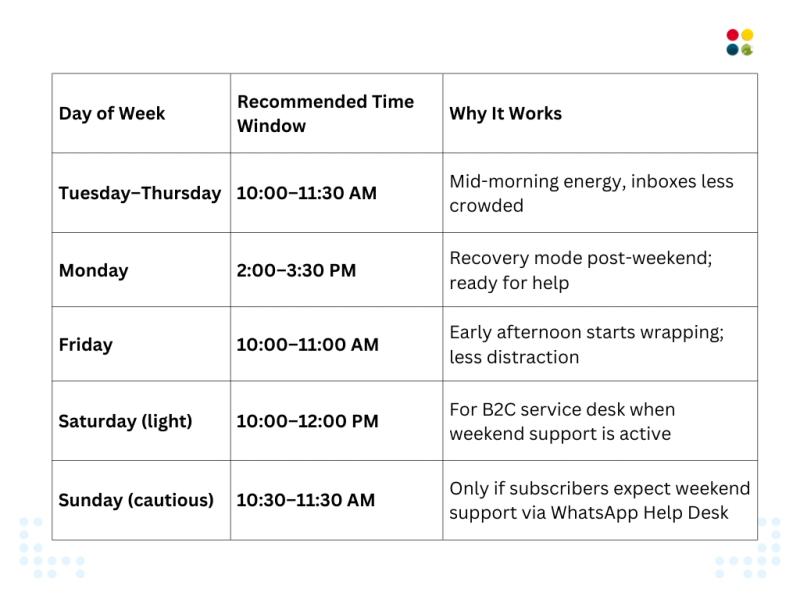
The Real-Time Support Wins
Imagine Anjali, a small business owner employing a WhatsApp Automation sequence to handle customer inquiry questions regarding delivery hours. On a slow Monday morning, she sent out her first message at 9 AM—and got tumbleweed. Next week, however, she experimented with sending follow-ups at 2:15 PM and had a 60% increase in responses. She later adjusted her WhatsApp API-driven bot to auto-pipeline messages mid-morning, which coincided with audience readiness, and client satisfaction shot up.
Her conclusion? It wasn’t tech or automation—it was timing. Employ your WhatsApp Support tools with compassion.
Quick-Scan Guide
● Best overall window: Tue–Thu, 10–11:30 AM
● Monday warm-up: 2–3:30 PM is optimal
● Friday touch-point: 10–11 AM avoids the Friday slump
● Weekend (if relevant): Target Saturday 10–12 PM; Sunday only if anticipated
Thoughts to Ponder
● How familiar are you with your customer habits—are they early risers, lunch-break surfers, or night-owls?
● Can your WhatsApp Solutions implement dynamic timing that learns when every subscriber is most responsive?
● Would you A/B test message send-times to optimize your Service Desk or WhatsApp Help Desk effectiveness?
Wrap-Up
Timing makes a plain message a productive touchpoint. With research-driven windows, you can strategically plan your WhatsApp API or Automation messages so that you appear at the right moment when your customers are most receptive. Whether it’s increasing WhatsApp Support response rates or simplifying your Service Desk process, timing is the unseen partner.
Key Takeaways
● Timing is everything: Mid-morning during Weekdays usually triumphs
● Don’t overwhelm weekends: Apply only if customers expect support
● Test & learn: Leverage analytics from your WhatsApp Solutions to discover your brand’s sweet spot
● Empathy > automation: Allow human rhythms to inform your WhatsApp API flows
Conclusion
In the world of fast-scroll today, messaging is not only what you say—it’s when. With WhatsApp Support, WhatsApp Automation, and WhatsApp API tools at your disposal, you can sync your outreach to customer energy patterns and see engagement, satisfaction, and ultimately conversions soar. Send messages at the right time, show respect for your audience, and let your Service Desk conversations engage—not disturb.
Dialdesk to the rescue. Maximize your WhatsApp Help Desk and API integrations with intelligent scheduling, one-on-one timing analytics, and effortless automation.
Ready to make every message matter?
Let’s get started—reach out to DialDesk today to supercharge your customer conversations.