OVERVIEW
This guide explores how WhatsApp has transformed from a personal messaging app into a business powerhouse, helping brands connect with customers instantly and personally. It covers everything from setting up WhatsApp Business to using automation, CRM integration, and analytics to enhance customer experience. The blog also highlights practical use cases, best practices, common challenges, and future trends — showing how tools like DialDesk empower businesses to unify communication across WhatsApp, calls, and chat.
Introduction
In today’s hyper-connected world, customers expect instant communication and personalized support. Over 2 billion people use WhatsApp, and more than 80% of users say they prefer messaging businesses over calling or emailing.
For growing brands, that’s a massive opportunity. WhatsApp has evolved from a personal chat app into a full-fledged business communication platform — helping brands engage, support, and sell, all in one place.
In this guide, we’ll break down exactly how to use WhatsApp for business, how to set it up, and how to make the most of its features to drive customer experience, conversions, and growth.
What is WhatsApp Business and How Does It Work?
WhatsApp Business is a specialized version of the app built for entrepreneurs, small businesses, and enterprises. It lets you create a verified business profile, automate customer responses, send order updates, and even showcase a product catalog.
There are two main versions:
● WhatsApp Business App – Ideal for small businesses handling limited daily conversations.
● WhatsApp Business API – Designed for larger teams that need automation, CRM integration, and multi-agent support.
At DialDesk, we help brands deploy both versions — from setting up verified WhatsApp Business profiles to integrating automation for customer experience (CX) across WhatsApp, calls, and chat. You can learn more about the technical setup in the official WhatsApp Business API Documentation.
Benefits of Using WhatsApp for Business
Using WhatsApp for business isn’t just about convenience; it’s about transforming your customer experience strategy.
1. Real-Time Engagement
Respond instantly to customer queries — no missed calls, no delays.
2. Personalized Interactions
Leverage quick replies, customer history, and saved templates to make every chat feel one-on-one.
3. Higher Customer Satisfaction
Faster responses lead to better reviews, higher NPS, and repeat sales.
4. Seamless Integration with CRM and Telephony
When connected with cloud telephony or a contact center solution, WhatsApp becomes a part of your complete customer journey. DialDesk’s omnichannel system lets you manage calls, chats, and WhatsApp messages under one unified dashboard — delivering exceptional Customer Experience.
How to Set Up WhatsApp Business (Step-by-Step)
Step 1: Download the App
Install the WhatsApp Business app from the Play Store or App Store.
Step 2: Verify Your Business Number
Use a dedicated number for your business communications.
Step 3: Create Your Profile
Add your business name, logo, website, working hours, and a brief description.
Step 4: Set Up Quick Replies and Greeting Messages
Use pre-set templates to respond quickly and keep conversations consistent.
Step 5: Build Your Catalog
Showcase your products and services with pricing, descriptions, and images.
For brands that want scalability and automation, integrating the WhatsApp Business API is the next step. DialDesk simplifies the process — connecting your WhatsApp account with advanced features like chatbots, analytics, and CRM integration.
If you ever face issues during setup or verification, refer to how to contact whatsApp support anytime for quick assistance.
Real-World Use Cases of WhatsApp for Business
1. Customer Support
Offer 24/7 support using a blend of chatbots and live agents. With DialDesk’s WhatsApp Solution Provider services, you can manage high-volume customer interactions seamlessly.
2. Order Notifications and Tracking
Automatically send order confirmations, dispatch details, and delivery updates.
3. Lead Generation and Qualification
Engage website visitors, qualify leads, and forward hot prospects directly to your sales team.
4. Marketing and Promotions
Send targeted broadcasts about new launches, offers, or events — but only to customers who have opted in.
5. Feedback and Surveys
Collect instant feedback to improve services and build customer trust.
6. Customer Retention
Stay top-of-mind with personalized re-engagement campaigns and post-purchase support.
WhatsApp Business Best Practices
To maximize ROI and maintain customer trust, follow these best practices:
1. Maintain Professional Tone
Keep your messages conversational but aligned with your brand personality.
2. Use Verified Business Accounts
Apply for the green tick verification to enhance trust and credibility.
3. Respect Customer Privacy
Only message users who have explicitly opted in to receive updates.
4. Combine Human + AI Touch
Automation is powerful, but human empathy makes conversations memorable. DialDesk combines AI chatbots and trained live agents to provide that perfect balance — a vital element of effective what is customer experience management.
5. Track Key Metrics
Monitor response time, resolution rate, and satisfaction scores to measure impact.
WhatsApp Business API: Scaling Customer Conversations
The WhatsApp Business API is designed for medium to large enterprises that need automation and analytics at scale. It connects WhatsApp with tools like CRM, cloud contact centers, and AI systems.
Key advantages include:
● Multi-agent access for large teams
● Automated workflows and routing
● Message templates for order updates, OTPs, and promotions
● Integration with DialDesk’s AI-powered CallMaster for real-time insights
DialDesk helps businesses integrate WhatsApp API into their existing ecosystem — allowing them to automate conversations, broadcast messages, and gain visibility across every customer interaction.
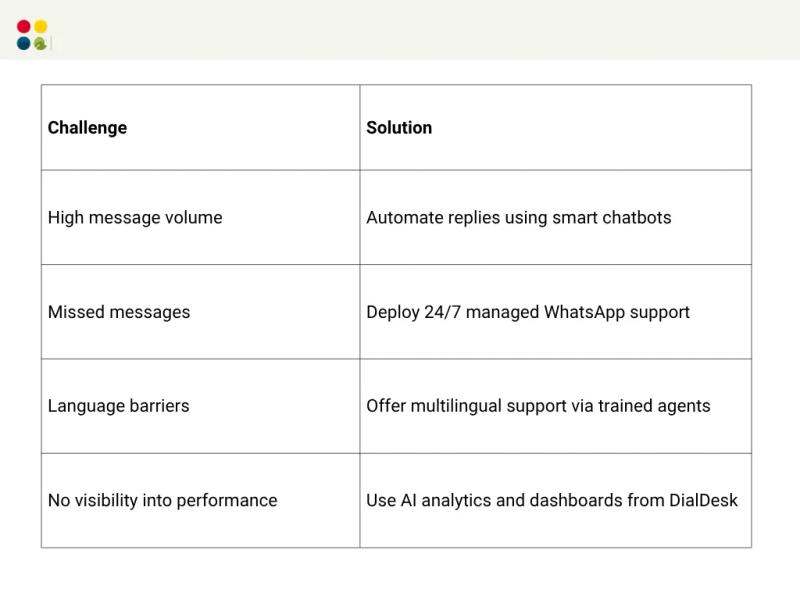
Common Challenges (and How to Solve Them)
The Future of WhatsApp for Business in 2025
As WhatsApp continues to evolve, it’s becoming more than a messaging platform — it’s turning into a complete business communication ecosystem.
Expect integrations with payments, CRM, and marketing automation tools. AI-driven personalization will allow businesses to anticipate customer needs even before they ask.
By partnering with DialDesk’s Cloud Contact Center Solutions, businesses can unify calls, WhatsApp, and chat interactions under one intelligent CX platform — powered by data, automation, and human expertise.
Conclusion: Turn Conversations into Conversions
WhatsApp is no longer optional — it’s essential. Whether you’re a startup looking to scale or an enterprise aiming for better customer experience, knowing how to use WhatsApp for business can transform your support, marketing, and engagement.
With DialDesk, you don’t just set up WhatsApp for business — you unlock a complete customer experience engine. From automation to analytics, DialDesk helps you manage every message like it’s in-house, but without the overhead.
Switch to CX That Works Like It’s In-House — Without You Lifting a Finger.
Set up your WhatsApp for Business with DialDesk today!