OVERVIEW
● In this blog, we’ll explore how businesses and professionals can convert voice recordings into accurate, searchable transcripts using DialDesk.
● We’ll dive into the practical steps, real-world benefits, and data-backed insights behind voice transcription, along with expert tips for maximizing productivity.
● You’ll also get a glance at how AI-driven solutions like DialDesk are reshaping communication workflows.
Introduction
Communication today is fast, multi-channel, and transient. Calls and meetings zip along at breakneck pace — but the content within them is invaluable. For companies, one piece of information lost can mean missed opportunities, compliance issues, or misguided strategies.
Enter voice transcription — the bridge between spoken words and actionable insights. While manually noting down conversations is cumbersome and error-prone, AI-driven platforms like DialDesk have made it effortless to turn Voice Recording to Transcript into structured, searchable text.
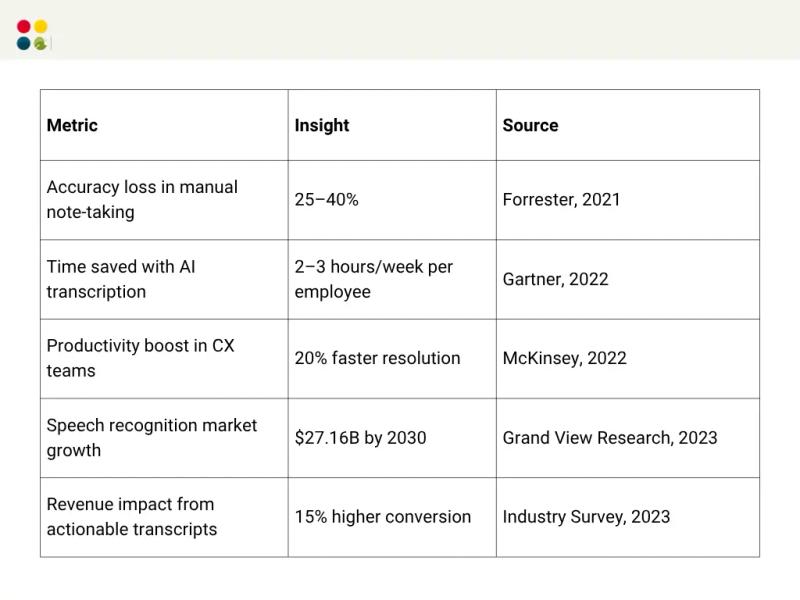
And here’s the clincher: based on Grand View Research, 2023, the market for global speech and voice recognition is estimated to hit $27.16 billion by 2030, led principally by demand for precision transcription devices in corporate communications.
Whether you work in sales, customer service, HR, or management, transcription is no longer a nicety — it’s a necessity. And when executed properly, it has the power to revolutionize how you record, store, and take action on spoken information.
Why Transcription Matters?
● Save Time: Teams spend 2–3 hours every week manually summarizing calls (Source: Gartner, 2022). AI transcription reduces this to seconds.
● Increase Accuracy: Human note-taking tends to miss 25–40% of information (Source: Forrester, 2021).
● Increase Productivity: Let workers work on insights instead of typing.
● Compliance & Record-Keeping: Required for legal, financial, and medical industries.
● Actionable Insights: Transcription with AI sometimes includes analytics for trend, sentiment, and follow-up actions.
How DialDesk Turns Voice Recordings into Transcripts?
The process of Voice Transcription using DialDesk is easy, organized, and business-driven:
Step 1: Record or Upload Audio
● Upload existing recordings (calls, meetings, interviews).
● Or utilize DialDesk’s built-in voice recorder with transcription for live calls.
Step 2: AI-Powered Transcription
● DialDesk’s AI transcribes real-time or post-call speech.
● Supports multiple accents, background noise, and industry jargon.
Step 3: Review & Edit
● Edit sections if necessary.
● Highlight key points for easy reference.
● Tag keywords for keyword-searchable archives.
Step 4: Search & Organize
● Search using DialDesk’s search tool to locate previous conversations by keyword, speaker, or date.
● Organize transcripts by project, client, or department.
Step 5: Export & Share
● Download transcripts in various formats.
● Share internally or with clients, keeping all stakeholders on the same page.
Punchy Stats at a Glance
Benefits of DialDesk Voice Transcription
● High Accuracy: Human-like AI Transcription, even with poor-quality audio.
● Multilingual Support: Supports multiple languages and accents.
● Real-Time Capability: Transcribe live calls in real-time.
● Searchable Knowledge Base: Quickly access past calls and meetings.
● Seamless Integration: Integrates with CRM, team tools, and analytics platforms.
Thoughts to Ponder
● How many opportunities slip away because key call information wasn’t recorded?
● Would your team be able to make better decisions if every conversation were immediately searchable?
● What does it take to comply if all calls have a reliable transcript?
Key Takeaways
● Voice Recorder with Transcription is a strategic capability, not a nicety.
● Manual transcription takes time and is prone to errors; AI transcription takes care of both.
● DialDesk provides a complete, accurate, and searchable solution for businesses.
● Incorporating transcription into processes enhances productivity, compliance, and decision-making.
Wrap Up
The audio-to-text shift is more than just a technical nicety — it’s a business benefit. With DialDesk, it’s quick, precise, and actionable to convert a voice recording to a transcript. For sales calls, customer service, or internal meetings, having all conversations in text provides your team with an edge.
Ready to streamline your workflow and never lose a detail again?
Try DialDesk Voice-to-Text today and transform the way your business communicates.