OVERVIEW
WhatsApp is no longer merely a messaging application—it’s evolved into a center of business communication, social encounters, and even money transactions in most countries. Yet with greater use comes greater danger. From phishing scams to data thefts, remaining safe is more essential than ever.
In this blog, we will see how to effectively use the WhatsApp Help Center, practice safety, steer clear of scams, and keep yourself private. We will also present actionable tips, expert advice, and important statistics to enable you to use WhatsApp securely.
Introduction
Your WhatsApp number is not just a messaging app; it’s an extension of yourself. It stores your private conversations, business talks, and even personal financial details at times. But still, most don’t care about security—until something happens amiss.
The WhatsApp Support Center is your defense line. It’s not only a store of FAQs; it’s a security arsenal meant to assist you in learning about risks, controlling privacy settings, and fixing problems on time. Yet, most people either overlook it or are clueless about how to utilize it effectively.
In this blog, we’re going to move beyond generic guidance. We’re going to demonstrate useful steps you can take to keep safe, avoid scams, safeguard your data, and get the WhatsApp Help Center on your side. Whether a personal or business user, this guide is for you.
Understanding WhatsApp Risks
Before diving into safety strategies, it’s important to know the threats:
● Phishing & Scam Messages: Scam links disguised as WhatsApp Support.
● Account Hijacking: Hackers gain access to accounts through OTP or weak passwords.
● Data Privacy Risks: Accidental sharing of data with third-party apps.
● Spam & Malware: Spam that tricks you into downloading dangerous apps.
Stats to Note:
● As of 2024, WhatsApp boasts more than 2 billion monthly active users, according to Statista 2024, making it an attractive target for cybercriminals.
● A 2023 report by Kaspersky reported a 47% rise in messaging app scams across the world, with WhatsApp topping the list.
How Does WhatsApp Help Center Keep You Safe?
The WhatsApp Help Center provides several tools to safeguard users:
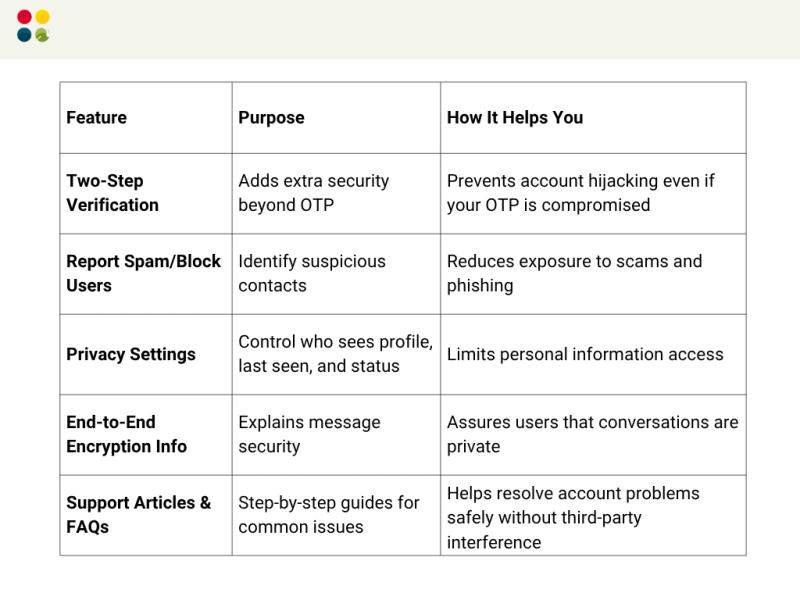
Tips to Stay Safe on WhatsApp
1. Enable Two-Step Verification
An extra layer of protection blocks unwanted logins. Ensure your PIN is special and not shared with others.
2. Scrutinize Messages from Unknown Contacts
Never open links or download files from unrecognized numbers. Phishing frauds usually manifest as dire WhatsApp notifications.
3. Regularly Check Privacy Settings
Control who can view your profile picture, status, or last seen. Restrict access to contacts only, and not everyone.
4. Use WhatsApp Help Support Before Searching Google
Avoid clicking on unfamiliar links saying they are WhatsApp help. Utilize official WhatsApp Help Desk Center support pages. This avoids getting trapped in fake site traps.
5. Monitor Active Sessions
Regularly check your WhatsApp Web and phone sessions. Log out of devices that you don’t know.
6. Avoid Third-Party Apps
Third-party apps that give you more features actually compromise your safety. Be with official WhatsApp apps and features.
Quick Safety Checklist
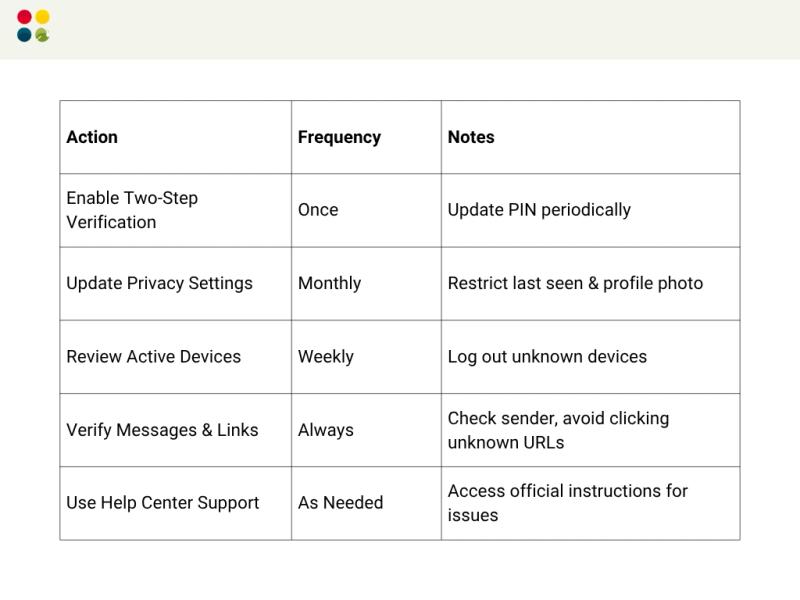
Thoughts to Ponder
● Your WhatsApp account is a hacker’s goldmine. Are you giving it the care it needs?
● Scammers are constantly updating their tricks. Even your most trusted contacts can be hacked. Vigilance is constant, not sporadic.
● Each action you take in the Help Center deepens your online security—do you use it to the full?
Key Takeaways
● WhatsApp Help Support is your go-to guide for safety—do at your own risk if you ignore third-party tips.
● Two-step verification and settings for privacy are not optional for today’s users.
● Monitoring sessions, contacts, and links on a regular basis significantly minimizes exposure to threats.
● Stay aware, stay vigilant, and empower yourself with official information.
Wrap Up
Being safe on WhatsApp isn’t paranoia; it’s taking informed action. With the WhatsApp Help Center, checking your privacy settings, and adopting time-tested safety habits, you safeguard your personal and work communications from online attacks. Digital safety is proactive, not reactive.
Conclusion
Your WhatsApp account is a window into your online life. Guard it with care, official assistance, and intelligent security practices. Have the WhatsApp Help Center be your first stop for any account or security issue. Safety today ensures peace of mind tomorrow.
Require expert advice on handling digital communication and support securely?
DialDesk provides AI-driven analysis and solutions for securing your communication channels and enhancing CX.