OVERVIEW
● In this blog, we’ll cover why CRM and WhatsApp API integration is more than a “nice-to-have”.
● Discuss the Step-by-step integration approach: from setup to automation.
● Highlight the Real business benefits: faster support, better conversions.
Introduction
Your customer doesn’t care where their message ends up—as long as they receive a reply. Whether they pose a question via WhatsApp, send an email, or dial your helpline, their expectation remains the same: a prompt, personalized reply.
But there’s the catch: customer conversations are everywhere, and CRMs tend not to speak the same language as contemporary messaging apps.
If you’re still switching between your CRM and WhatsApp Web—or copying chat logs by hand—this guide is for you.
Connecting the WhatsApp Business API to your CRM and Calling Software isn’t just about ease. It’s about smarter support, deeper relationships, and long-term growth.
Let’s break it down!
Why Should You Integrate WhatsApp API With Your CRM?
Here’s what businesses are missing without integration:
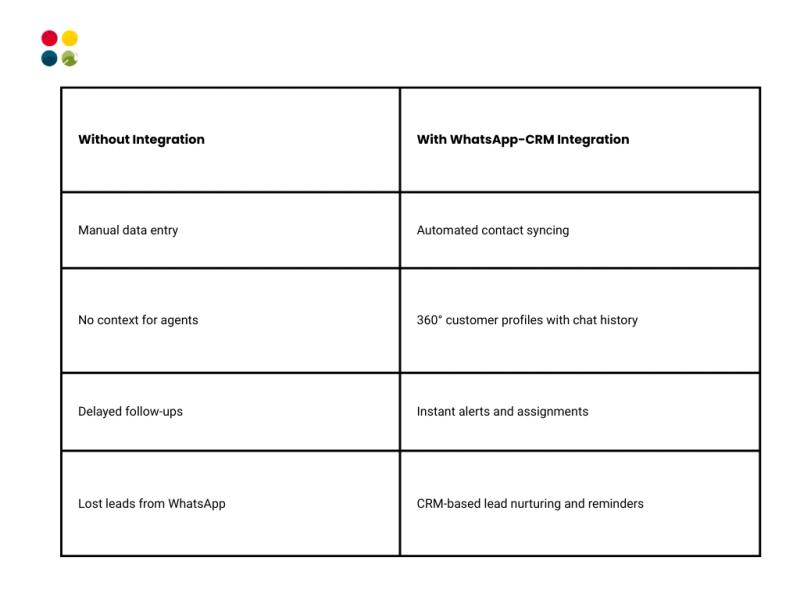
Stat to Consider:
More than 2 billion people use WhatsApp across the world, and 68% of customers report that they’re more likely to purchase from businesses that they can message directly.
(Source: Meta for Business, 2024)
How to Integrate WhatsApp Business API With Your CRM?
Step 1: Choose a WhatsApp API Provider
Meta doesn’t sell the API directly—you’ll have to use a Business Service Provider (BSP) such as Twilio, Gupshup, or yes, DialDesk.
Tip: Select a provider that offers simple CRM integration and automation.
Step 2: Ensure You Have WhatsApp Business API Access
This means:
● A verified Facebook Business Manager ID
● Approved WhatsApp number
● Messaging templates (for outbound communication)
Step 3: CRM Integration Setup
Here’s how the connection generally works:
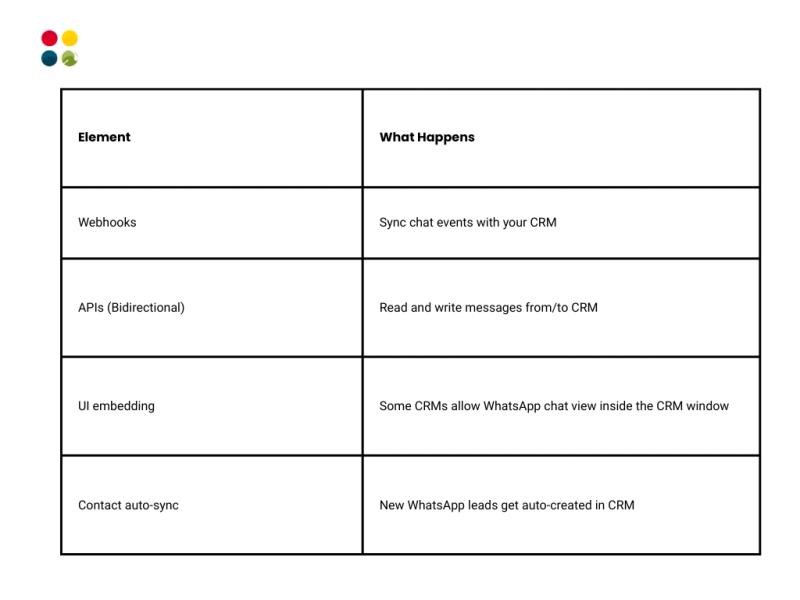
Step 4: Configure Workflows and Auto-tags
Example: When a customer messages “order status” on WhatsApp:
● Auto-tag as “Order Query”
● Auto-assign to Order Management Team
● Update CRM ticket with conversation logs
● Trigger a callback from your calling software if query still not resolved
Step 5: Enable Calling Integration
Want to call customers directly from the CRM/WhatsApp interface?
Seek platforms that have:
● Click-to-call from WhatsApp CRM or WhatsApp logs
● Auto-logging of calls into CRM timelines
● Integrated call recording and transcription
DialDesk’s cloud calling technology does all three—along with integrating WhatsApp, SMS, and email, all within one platform.
Use Cases That Make Integration Worth It
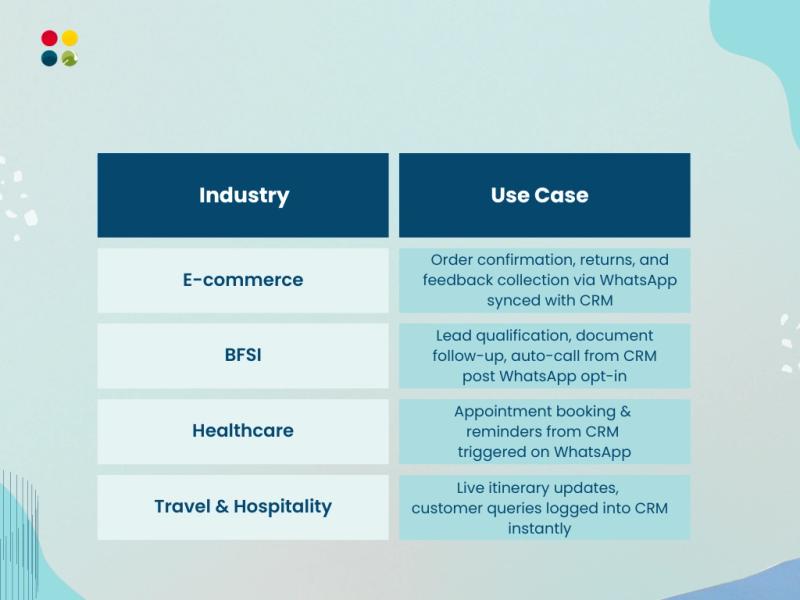
Thoughts to Ponder
● Are your agents tab-switching too much?
● Are you losing leads due to the fact that chats are not logged?
● Do customers call out, repeating the issue?
● Can your CRM auto-suggest solutions from WhatsApp Chat Support history?
If you said yes to even one of them, it’s time to integrate.
Expert Insight: “CRMs are only as good as the data they have. WhatsApp conversations contain the richest real-time data about customer intent—don’t let it go to waste.”
— CX Automation Lead, DialDesk
Real Results from CRM + WhatsApp API Integration
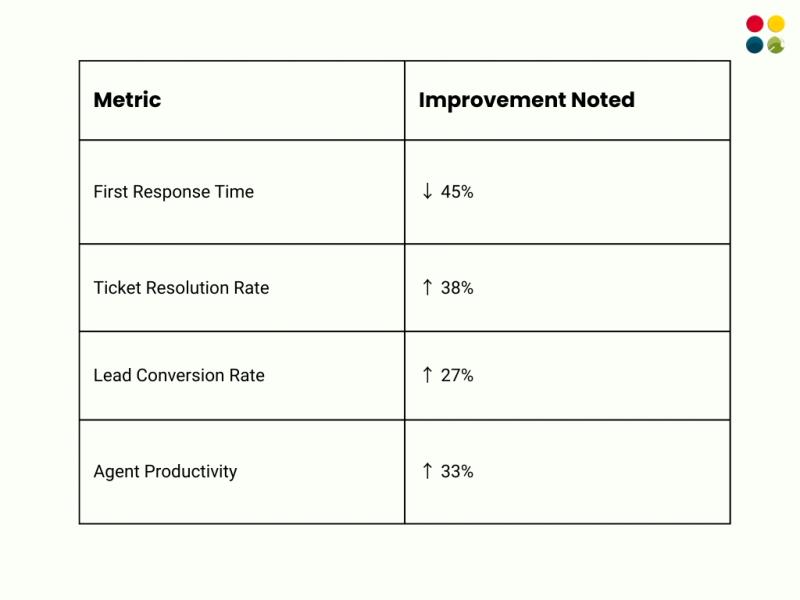
*Based on DialDesk client use cases, 2024
Wrap-Up
Merging WhatsApp Business API with your CRM and calling software isn’t a trend to follow—it’s creating a future-proof, customer-centric communication system.
It eliminates friction, provides more visibility, and puts conversations under one roof—so your team can concentrate on what matters most: serving customers better.
Key Takeaways
● WhatsApp is a go-to channel for billions—your CRM needs to mirror that.
● CRM + WhatsApp integration makes tracking, WhatsApp Customer Support, and sales easier.
● Select platforms that enable omnichannel conversations, calling, and automation.
● Integration isn’t just technical—it’s strategic.
Want to End Copy-Pasting Chat Logs?
DialDesk can assist you in integrating WhatsApp, calling software, and CRM into a seamless solution.
Schedule a free demo with our team!