OVERVIEW
This guide explains everything about how to get the WhatsApp Business API in 2025 — from eligibility requirements to setup and benefits. It walks you through each step of onboarding via DialDesk’s managed API solution, highlights its advantages such as automation, personalization, and security, and provides best practices for implementation. The post also compares the WhatsApp Business App vs. API, outlines pricing, and shows real-world use cases across industries like healthcare, finance, and e-commerce. In short, it’s a complete roadmap for businesses that want to deliver faster, smarter, and more customer-centric experiences using WhatsApp.
How to Get WhatsApp for Business API – A Step-by-Step 2025 Guide
In today’s customer-first era, brands can’t afford to make customers wait. Instant communication has become the new standard — and WhatsApp leads that revolution. With over 2 billion users worldwide, it’s the most direct and trusted way for businesses to interact with their customers.
If you’re wondering how to get WhatsApp for Business API, this guide will walk you through everything — from setup to benefits and best practices — so you can deliver faster, smarter, and more personalized conversations through DialDesk’s managed WhatsApp API solution.
What is WhatsApp Business API?
The WhatsApp Business API Documentation is Meta’s official interface designed for medium and large businesses. It enables brands to:
● Send notifications, order updates, and alerts automatically.
● Manage conversations across multiple agents.
● Integrate WhatsApp with CRMs, chatbots, and contact-center systems.
Unlike the free WhatsApp Business App, the API allows automation and scalability — perfect for organizations handling thousands of daily customer interactions.
WhatsApp Business App vs. WhatsApp Business API
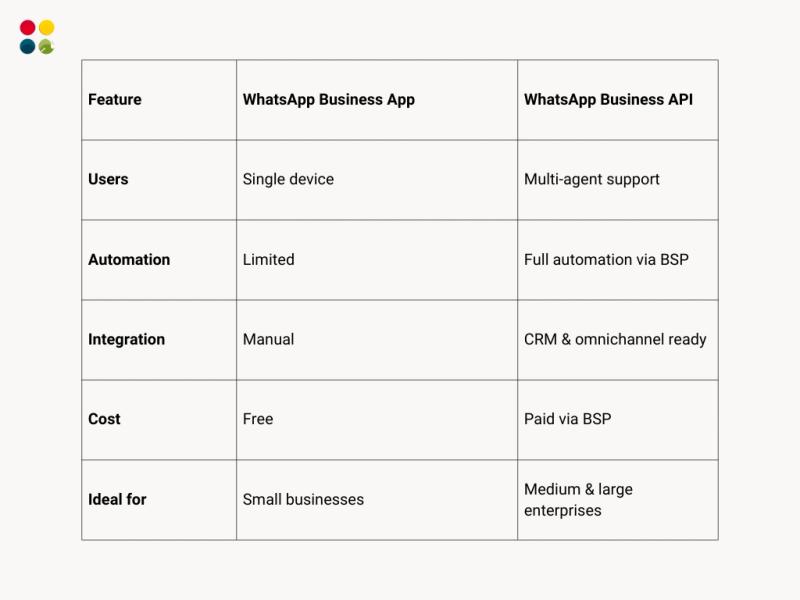
If your business handles hundreds of daily chats or uses multiple communication tools, the API is the smarter choice. It provides automation, analytics, and integration with DialDesk’s AI-powered omnichannel contact-center software — helping you centralize WhatsApp, voice, and chat in one dashboard.
To further enhance your digital engagement strategy, learn what is customer experience management and how it aligns with your WhatsApp communication goals.
Why Businesses are Switching to WhatsApp API in 2025?
1. Faster Response Times
Automate instant replies with chatbots and reduce waiting time drastically.
2. Personalized Communication
Send tailored messages, offers, and order confirmations directly to customers’ WhatsApp inbox.
3. Secure and Verified Messaging
Your official business profile appears with a green tick, improving credibility and trust.
4. End-to-End Automation
Integrate WhatsApp with your existing CRM or DialDesk platform to track leads, conversions, and support tickets — all in real time.
Pre-Requisites Before Applying for WhatsApp Business API
To get access, ensure the following are in place:
● Meta Business Verification – Verify your company in Meta Business Manager.
● Official Business Website & Email Domain – Must match your business identity.
● Active Phone Number – Can receive calls or SMS for OTP verification.
Step-by-Step: How to Get WhatsApp for Business API
Step 1: Verify Your Business – Create or log into your Meta Business Manager and complete business verification.
Step 2: Choose an Official BSP – Select a WhatsApp Solution Provider such as DialDesk to manage hosting, setup, and API connectivity.
Step 3: Submit Business Information – Provide company name, category, and display information to Meta for approval.
Step 4: Add and Verify Your Number – Use an existing business number or get a virtual number through DialDesk. Meta sends an OTP to confirm ownership.
Step 5: Configure Your WhatsApp Business Profile – Add your company logo, description, and links. This builds trust and professionalism.
Step 6: Connect to DialDesk Platform – DialDesk integrates the API into its omnichannel suite — enabling chatbots, automated flows, and analytics dashboards without coding.
Benefits of Using WhatsApp Business API via DialDesk
1. Zero-Code Deployment – DialDesk handles the entire technical process, letting you go live in hours instead of weeks.
2. Unified Customer View – Manage calls, WhatsApp chats, and social messages through a single 360° CX dashboard.
3. AI-Driven Insights – Monitor agent performance, sentiment, and compliance automatically using DialDesk’s CallMaster AI.
4. Industry-Specific Customization – From healthcare to BFSI, DialDesk tailors WhatsApp workflows to match your sector’s needs.
Check out how businesses are improving performance using how to measure customer experience to evaluate real customer satisfaction and engagement through analytics.
Best Practices Before Launching Your WhatsApp API
1. Define Clear Use Cases – Decide whether you’ll use WhatsApp for sales, support, or notifications.
2. Combine Automation and Human Support – Use chatbots for FAQs, but route complex queries to agents — a principle also vital when outsourcing customer service to external partners.
3. Maintain Compliance – Always follow Meta’s Business Policy and get customer consent before messaging.
4. Optimize Message Templates – Keep templates short, professional, and action-oriented to increase open rates.
For technical and customer communication assistance, you can also explore WhatsApp Support for smooth integration and troubleshooting.
WhatsApp Business API Pricing Overview
Meta charges per 24-hour conversation session, categorized as:
● User-initiated (lower cost)
● Business-initiated (slightly higher cost)
DialDesk simplifies billing with transparent, customized plans that combine WhatsApp automation, AI analytics, and support management for predictable monthly costs.
Common Use Cases for WhatsApp Business API
E-Commerce
● Order confirmations
● Delivery updates
● Abandoned-cart reminders
Healthcare
● Appointment notifications
● Report delivery
● Patient feedback collection
Education
● Admission updates
● Fee reminders
● Class notifications
Finance
● Payment alerts
● Policy renewals
● Fraud-detection communication
Conclusion
The WhatsApp Business API isn’t just a tool — it’s a customer-experience accelerator. It empowers brands to build stronger connections, boost engagement, and deliver real-time support.
By partnering with DialDesk, you skip the technical barriers and gain a fully managed, AI-powered communication ecosystem that drives measurable results.
Ready to scale your customer engagement?
Let DialDesk handle everything — from Meta verification to chatbot automation — while you focus on growth.
Book your free demo now and activate your WhatsApp Business API within days!