OVERVIEW
● Customer support today isn’t just about answering queries—it’s about answering them fast, round the clock, and at scale.
● With the increasing popularity of WhatsApp as the preferred communication channel for more than 2 billion people worldwide, companies are now leveraging this medium to provide timely support. But the challenge here is: how do you handle hundreds (or thousands) of customer inquiries without exhausting your support agents? That’s where automation comes in.
● In this blog, we will reveal how you can automate customer support inquiries on WhatsApp with smart support solutions. You will find out the why, the how, the tools, the avoid-traps, and real-world value. Whether you are a scaling D2C business or a mature enterprise, this blog will take you through the playbook of making WhatsApp a 24×7 support powerhouse.
Introduction: The CX Evolution You Didn’t Know You Needed
Customer support isn’t broken—it’s antiquated.
The old-school approach of email support and IVRs is akin to calling into thin air when your customer simply wants a speedy response. And let’s guess what? 84% of customers anticipate a brand to reply within 24 hours on social media and messaging platforms (Source: HubSpot Research). Yet most companies are still manually responding to every inquiry on WhatsApp.
The irony?
We’re living in a time when the AI system is smart enough to predict the next thing you’ll buy, yet the support always responds with, “Please wait while we check.”
It’s not about capability—it’s about adoption.
Step in WhatsApp Support Solutions—a suite of Customer Queries that can automate, personalize, and scale your support without sacrificing the human touch. But this isn’t merely about canned responses or chatbots. It’s about building a smart support ecosystem that combines AI, workflows, and CRM integration.
Let’s break it down.
Why Automate Customer Queries on WhatsApp?
Here’s what you unlock when you automate:
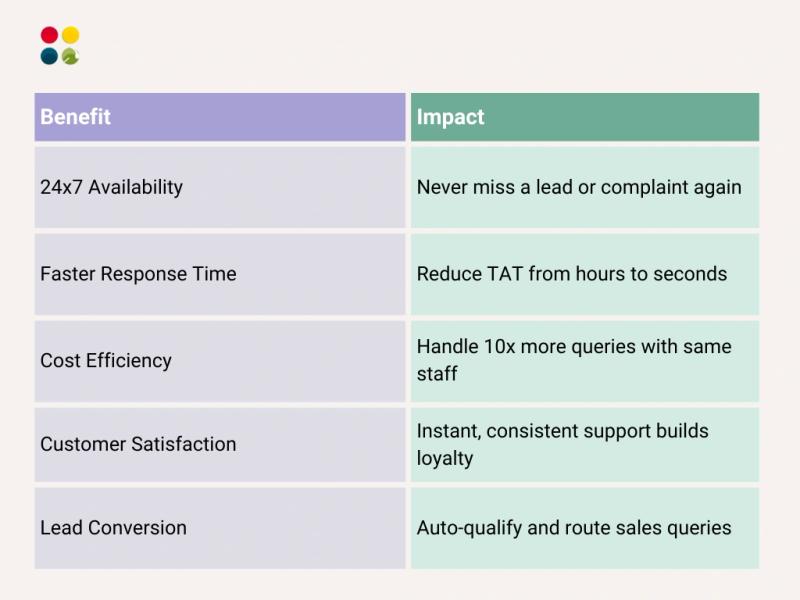
Meta Business Insights states that automated WhatsApp workflows can enhance customer satisfaction by 68% and decrease support expenses up to 40%.
How to Automate Customer Queries on WhatsApp (Step-by-Step)
1. Get Access to WhatsApp Business API
The free WhatsApp Business App is good—but not built for scale. You’ll need to switch to the API version via a Business Solution Provider (like DialDesk) to unlock automation.
2. Define Customer Journey Flows
Map out your common query types:
● Order status
● Product information
● Returns & refunds
● Appointment bookings
● FAQs
Then, design decision trees or workflows to guide users seamlessly.
3. Build or Integrate a WhatsApp Chatbot
You may create from scratch with tools such as Dialogflow or utilize pre-existing WhatsApp Help Center Solutions with AI + NLP features (quicker and wiser).
Pro Tip: Don’t just script bots. Utilize machine learning to detect intent, emotion, and even route to human agents when necessary.
4. Integrate With Your CRM and Helpdesk
Ensure the bot is able to pull information from your CRM (e.g., customer name, previous orders) and push chat transcripts into your ticketing system.
5. Enable Smart Handover to Agents
Automation does not equate to eliminating humans. The wizardry is in being aware of when to bring in an actual agent—particularly for escalations or emotionally charged inquiries.
6. Track KPIs and Improve
Some Crucial Metrics:
● Average Resolution Time
● Query Deflection Rate
● Customer Satisfaction (CSAT)
● First Response Time
● Bot to Human Handoff %
Tools such as DialDesk provide analytics dashboards to assist with tracking these in real-time.
Also Read: WhatsApp Call Center: How Real is This Trend in 2025?
Real-World Use Case
One regional electronics retailer automated their after-sales inquiries through WhatsApp through AI-based chatbots. Within 2 months:
● Response time dropped from 8 hours to 30 seconds
● Human workload reduced by 60%
● CSAT scores rose by 22%
● Weekly escalations dropped by 38%
And the cherry on the cake? Their WhatsApp now receives 85% of customer interactions—without the addition of more agents.
Thoughts to Ponder
● Are you still surveying customer satisfaction via email TAT when your audience resides on WhatsApp?
● If your competition is 24×7 through chatbot and you are not—customers whose attention you grab, will remember whom?
● Would you instead add more agents or develop smarter automation sequences?
Support is not a function anymore—it’s a growth driver.
Key Takeaways
● WhatsApp is not only for chat—it’s a business growth machine.
● By automating queries, you save time, money, and effort with a better customer experience.
● WhatsApp Business API + chatbot + CRM integration = CX powerhouse.
● Implement automation thoughtfully, not mindlessly—always reserve the human handover option.
● Optimize flows continuously based on real-time analytics.
Wrap-Up
Automation is no luxury for the future—it’s a necessity today.
If your company continues to answer every “Where’s my order?” or “Can I return this?” manually, you’re not only wasting time—you’re losing trust.
The wisest brands are leveraging WhatsApp Support Solutions to accomplish more with less, deliver instant satisfaction, and create meaningful customer relationships.
You don’t require a 50-agent setup to deliver world-class support.
You require smart automation, intelligent workflows, and the right tech partner.
Conclusion
The customer engagement landscape has changed. Humans desire instant answers, and they want them in a format that makes them feel most comfortable. Automating your WhatsApp Customer Support isn’t a bid to replace human beings—it’s a bid to supercharge your power to be there when it counts.
The winners of this age won’t be the ones who employ the most.
They’ll be the ones who have the brightest systems.
Ready to Level Up Your WhatsApp Support?
DialDesk helps brands automate, scale, and personalize their customer support on WhatsApp—without breaking the bank.
● WhatsApp API Access
● AI-Powered Chatbots
● Smart CRM + Agent Integration
● 24x7x365 Support
● End-to-End Analytics & Optimization
Let’s build a smarter support system together. Visit www.dialdesk.in or drop us a message to get started today.
No customer left behind. No query lost. Just smarter conversations.