CRM telephony integration connects your cloud phone system to your CRM, so calls are made, received and recorded inside the CRM itself. Reps click to call from a contact record, and every call log, recording and note is saved against the right customer automatically, without typing anything after the call.
Key Takeaways
- CRM telephony integration is the cloud-based form of computer telephony integration (CTI).
- The core features are click-to-call, automatic call logging and call recordings saved on the CRM record.
- DialDesk integrates with CRMs and helpdesks such as Zoho CRM, Salesforce, HubSpot, LeadSquared and Freshdesk.
- Choose a platform by checking CRM support, what gets logged, setup effort and reporting.
What Is CRM Telephony Integration?
CRM telephony integration links two systems most teams already use: the phone system that handles calls and the CRM that holds customer records. Once connected, the CRM knows about every call, and the phone system knows who is calling. A rep no longer switches between a dialer and the CRM, copying numbers in and notes out.
With cloud telephony, this connection runs over the internet through a connector or API, so there is no on-site phone hardware to wire into the CRM. That is why CRM with telephony, CRM with cloud telephony and cloud telephony integration usually point to the same setup today.
What Is Computer Telephony Integration (CTI)?
Computer telephony integration, or CTI, is the older, wider term for any setup that lets a computer control and track phone calls. In traditional call centers, CTI meant connecting an on-premise PBX to desktop software through middleware.
CRM telephony integration is a specific, modern use of CTI: the computer side is your CRM, and the telephony side is a cloud phone system. The goal is the same as classic CTI, which is to put call control and call data where agents already work.
Why Does a Phone System Without CRM Integration Create Blind Spots?
A phone system that doesn't talk to the CRM forces every rep to rebuild context by hand after each call: typing notes, updating the contact and logging the outcome. That manual step is where data goes missing.
Teams evaluating cloud telephony often focus on call quality and pricing, and overlook the feature that decides daily usability: how well it works with the CRM they already use. CRM integration closes this gap by linking every call to the contact record the moment it ends, so reps spend their time on conversations instead of data entry.
How Is CRM-Integrated Cloud Telephony Different from a Standalone Calling App?
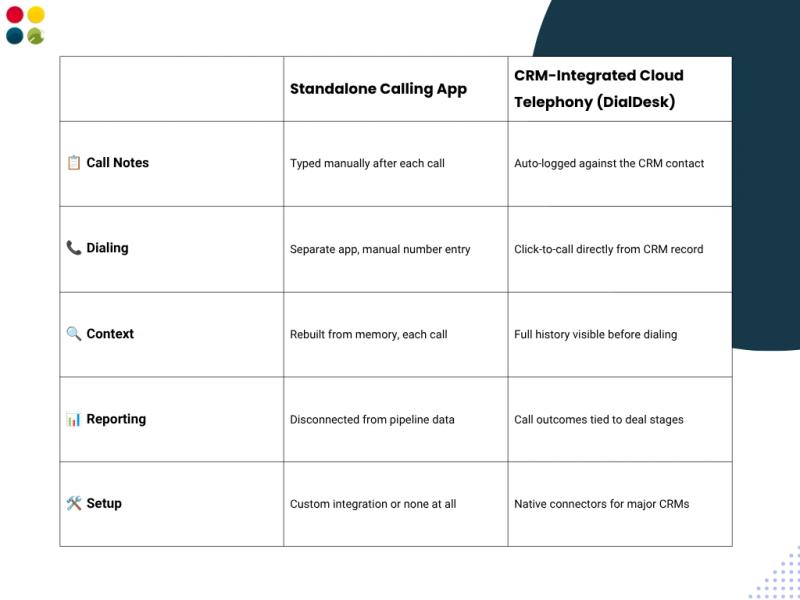
Summary of the comparison above: with a standalone calling app, call notes are typed manually after each call, numbers are dialled from a separate app, context is rebuilt from memory, reporting is disconnected from CRM data, and setup needs a custom integration or none at all. With CRM-integrated cloud telephony from DialDesk, calls are logged against the CRM contact, reps click to call from the CRM record, the full history is visible before dialling, and call data sits alongside CRM records for reporting.
How Does CRM Telephony Integration Work?
The exact steps depend on the CRM, but most integrations follow the same pattern:
- Connect the accounts. An admin links the cloud telephony account to the CRM through a ready connector or an API key.
- Map users. Each agent or rep in the CRM is matched to their calling user or extension.
- Choose what to log. Decide which call details are saved, such as call logs, recordings, notes and dispositions.
- Test a call. Place and receive a test call to confirm it appears on the right contact record.
- Train the team. Show reps how to click to call and where call history appears in the CRM.
Which Features Matter Most in a CRM Telephony Integration?
- Click to call from the CRM: dial any contact or lead with one click, with no manual number entry.
- Automatic call logging: every call, recording and note is saved to the contact, so there is no data entry after calls.
- Call history before dialling: reps see past conversations before they pick up or place a call.
- Cross-CRM support: the integration works with the CRM the team already uses, so there is no need to switch CRMs to get calling features.
- Call reports: call data can be reviewed next to customer records, which helps managers coach reps. For what to measure, see this guide to call analytics in cloud telephony.
Which CRMs and Helpdesks Can Cloud Telephony Connect With?
DialDesk integrates with CRMs such as Zoho CRM, Salesforce, HubSpot and LeadSquared, and with helpdesks such as Freshdesk. Custom or in-house systems can be connected through APIs. Teams that want calling and ticketing in one place can also use DialDesk's own customer service CRM.
The same logic applies on the support side: a call center CRM shows agents who is calling and what happened last time, which shortens calls and avoids asking customers to repeat themselves.
How Do You Choose the Best Cloud Telephony Provider for CRM Integration?
Before you shortlist the best cloud telephony providers, check these points:
- CRM support: does it connect with your CRM today, or only through custom work?
- Data logged: are call logs, recordings and notes saved to the contact automatically?
- Setup effort: can your admin set it up, or does it need a developer?
- Reporting: can managers see call activity next to customer records?
- Scale: will it handle more agents, numbers and channels as you grow, for example through a cloud contact center?
For a wider checklist, read what to look for in a cloud telephony vendor.
Has CRM-Based Support Worked for a Real Business?
Yes. DialDesk set up 24×7 multi-channel support, CRM-based service management and real-time alerts for an elevator and escalator manufacturer. The result was 55% faster response times, 48% better complaint resolution and 40% less manual coordination. Read the full case study: Transforming After-Sales Service with Real-Time Alerts & CRM.
DialDesk's platform is ISO 9001:2015 and ISO/IEC 27001:2022 certified, and 250+ companies across India use DialDesk.
Is CRM Telephony Integration Right for Your Team?
If your reps make or take calls every day and your customer data lives in a CRM, then yes. Without integration, every call adds manual work and every missed note leaves a gap in the customer record.
To recap: CRM telephony integration is the cloud form of CTI, it puts click-to-call and automatic call logging inside your CRM, and the right platform is the one that connects with the CRM you already use. If you want to see how this works with your CRM, book a demo below.