OVERVIEW
Inbound calling isn’t just “picking up customer calls.”
When done right, it becomes a revenue engine, a retention tool, and the fastest path to customer trust.
This guide breaks down a practical, India-focused roadmap for setting up an inbound calling process using cloud telephony.
You’ll learn:
● What Cloud Telephony actually solves
● How to structure inbound workflows
● How routing, IVR, and compliance work behind the scenes
● Industry benchmarks for SLAs
● Tools, team structure, and setup timelines
● A comparison table you can share internally
Whether you’re a startup, D2C brand, SaaS company, or enterprise, this walkthrough shows you how to build an inbound engine that’s fast, scalable, compliant, and customer-friendly.
Introduction
Inbound calls are the heartbeat of customer communication in India.
When customers call, they’re not browsing; they’re seeking resolution, clarity, or the final push before purchase.
According to the Salesforce State of Service Report (2024):
76% of customers still prefer calling a business when the issue is important or urgent.
This is why inbound support directly impacts:
● Abandonment rate
● Customer satisfaction
● Repeat purchase
● Revenue
● Brand reputation
And in 2025, Cloud Telephony has replaced traditional hardware-driven phone systems because businesses need:
● Remote agents
● Zero downtime
● Real-time analytics
● Call recording
● WhatsApp + voice integration
● Faster setup
● Lower cost
This blog unpacks how to set up your Inbound Calling Process using cloud telephony — step by step.
Why Cloud Telephony Is the Foundation of Modern Inbound Support?
Cloud Telephony = Voice over the internet + software + automation.
The benefits are massive:
✔ No hardware → No installation delays
✔ Remote-friendly → Agents anywhere
✔ Scalable → Add/remove agents instantly
✔ Centralized analytics → Track every metric
✔ Cost-efficient → 30–50% cheaper than legacy systems
✔ Instant recordings → QA becomes easier
Industry-specific benefits:
● D2C: Faster replacements + refund clarity
● SaaS: Lower churn with faster resolution
● Fintech: Real-time issue handling
● Healthcare: Round-the-clock inbound flow
Step-by-Step: How to Set Up an Inbound Calling Process
Step 1: Map Your Customer Journey
Inbound isn’t about calls — it’s about intent.
Identify your top call types:
● Product info
● Payments
● Delivery status
● Onboarding
● Technical help
● Complaints
● Refunds
● Escalations
Insight: 80% of Indian inbound calls fall into 6–8 categories. (Source: Dialdesk Inbound Data Report 2024)
Step 2: Choose the Right Cloud Telephony Platform
Look for:
● 99.9% uptime
● Multi-level IVR
● Call recording
● Skills-based routing
● Number masking
● Compliance (TRA, DND, data laws)
Top India-ready options:
● DialDesk
● Knowlarity
● Exotel
● Ozonetel
Pick based on volume, budget, team size.
Step 3: Set Up IVR Flows
A strong IVR reduces 20–40% agent workload.
Standard IVR levels:
Level 1: Language selection
Level 2: Purpose (order, refund, tech support, etc.)
Level 3: Route to queue or automation
Tips:
● Keep it under 3 levels
● Avoid long menu options
● Offer “talk to agent” early
Step 4: Implement Skills-Based Routing
Route calls based on agent expertise.
Example workflows:
● Product queries → Product team
● Technical issues → Tech team
● High-value orders → Priority queue
This improves First Call Resolution (FCR) by 24–35%. (Source: Freshworks CX Benchmark 2024)
Step 5: Create SLAs for Speed & Quality
These numbers define your customer experience.
Industry Benchmarks:
● Average Speed of Answer (ASA): 20–30 seconds
● Abandonment Rate: <5%
● FCR: >70%
● Call Quality Score: >85%
Track these weekly.
Step 6: Set Up Call Recording & QA Framework
Record 100% calls. Audit at least 10–15% weekly.
Include scoring for:
● Empathy
● Accuracy
● Product knowledge
● Resolution capability
● Compliance wording
This is where most Indian brands improve the fastest.
Step 7: Integrate CRM + Support Tools
Integrations reduce handle time.
Connect:
● Shopify / WooCommerce
● Freshdesk
● Zendesk
● HubSpot
● Zoho
Agents should see customer history instantly.
Step 8: Train Agents on Scripts, Tone & SOPs
A Cloud Telephony system is useless without trained agents.
Train on:
● Verification process
● Tone ● Common scenarios
● Escalations
● Follow-up procedures
Training improves agent productivity by 40% in 3 weeks. (Source: McKinsey Contact Center Insights)
Step 9: Analyze Data & Optimize
Use dashboards to track:
● Peak hours
● Busiest days
● Call drop reasons
● Agent efficiency
● Repetitive issues
Insights = better staffing + better scripts.
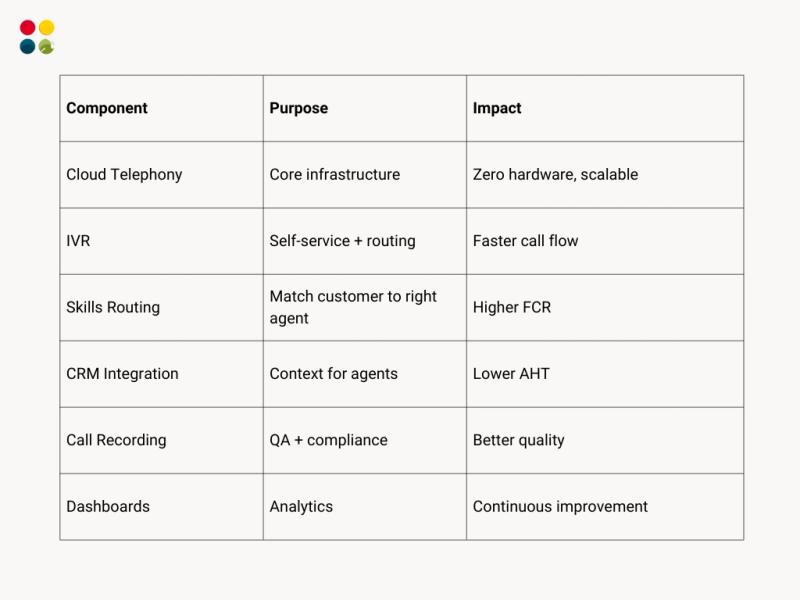
Cloud Telephony Setup
Common Mistakes to Avoid
● Overcomplicated IVR
● No routing logic
● Skipping QA auditing
● Hiring without SOPs
● No SLA benchmarks
● Not analyzing call volume patterns
Every mistake increases cost and reduces customer trust.
Thoughts to Ponder
● If your calls dropped to half, would customers be happier — or more frustrated?
● If your agents had customer context instantly, how much time would you save?
● Is your support built for your business today, or the business you want next year?
Key Takeaways
● Cloud telephony is now the backbone of Inbound Process support.
● Setup requires workflow design — not just buying software.
● Routing, IVR, and QA define call quality.
● Integrations reduce handle time significantly.
● Data-driven optimization keeps costs low and efficiency high.
Conclusion
Inbound Calling isn’t just an operational function — it’s a brand experience.
With cloud telephony, any business in India can build a scalable, intelligent, cost-efficient calling process that delivers fast resolutions and memorable customer experiences.
The brands that win are the ones that treat inbound support as a strategic system — not a cost center.
Wrap Up
Setting up inbound support with Cloud Based Call Centers gives you:
● Fewer missed calls
● Lower cost per contact
● Better customer satisfaction
● Faster resolutions
● More efficient teams
Inbound done right becomes a competitive advantage.
Want a ready-made inbound calling system with cloud telephony, trained agents, QA, and reporting?
DialDesk can set up your inbound process in just 48–72 hours.