How to Use AI in Customer Service?
How to Use AI in Customer Service? Start with three foundations: (1) deploy conversational AI — chatbots and voice bots — to automate routine query resolution; (2) integrate real-time sentiment analysis to detect customer emotion mid-interaction; (3) implement automated quality assurance to monitor 100% of contacts. Build from these into predictive routing, agent assist, and proactive retention. DialDesk's AI in Customer Service platform implements all six layers — typically live within 30 days, no hardware required.
Why Most Businesses Get AI Customer Service Implementation Wrong?
The most common AI customer service implementation failure is deploying too broadly, too fast. Businesses invest in the full technology stack before they have established clear use-case priorities, success metrics, or integration checkpoints. The result: technology that runs but does not improve outcomes.
This guide shows exactly how to use AI in Customer Service in a sequenced, measurable way — starting with the highest-ROI capabilities and building systematically toward full AI integration.
💡 Why It Matters
Businesses that implement AI in Customer Service in a phased, use-case-prioritised approach see ROI within 30–60 days. Those that deploy without a sequenced plan typically see 12–18 months before meaningful outcome improvement (Gartner, 2024).
The Phased Implementation Map: How to Use AI in Customer Service
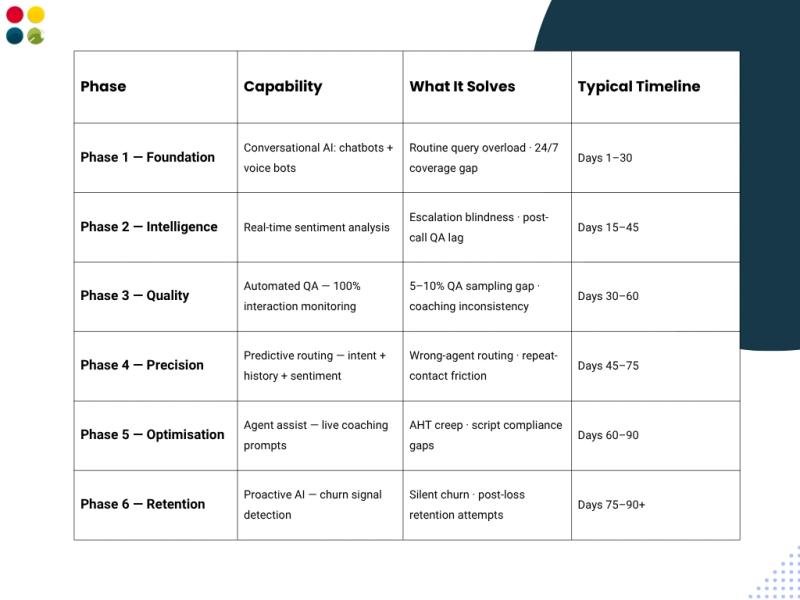
How to Use AI in Customer Service: Six Use Cases in Detail
Use Case 1: Conversational AI for Query Automation
How to Use AI in Customer Service starts with query automation. Deploy NLP-powered chatbots on your website, WhatsApp, and mobile app — and voice bots on your IVR — to resolve routine queries autonomously. Order status, FAQs, account checks, password resets, and appointment bookings. DialDesk clients automate 40–60% of contacts within 30 days.
Use Case 2: Real-Time Sentiment Analysis for Live Intervention
AI in Customer Service sentiment analysis covers 100% of live interactions — detecting frustration, confusion, and churn risk mid-conversation from acoustic signals and linguistic patterns. Supervisors receive live alerts. Agents receive coaching prompts. DialDesk's sentiment engine reduces escalations by 25–38%.
Use Case 3: Automated Quality Assurance at Scale
How to Use AI in Customer Service for Quality? Replace 5–10% manual QA sampling with 100% automated interaction review. DialDesk's CallMaster AI analyses every call, chat, and WhatsApp message for script compliance, sentiment accuracy, and resolution quality — with team-level reporting updated in real time.
Use Case 4: Predictive Intent-Based Routing
AI in Customer Service routing scores every incoming contact for intent, account history, and sentiment before routing — matching each query to the agent most likely to resolve it first time. Amazon Connect's predictive routing delivers 30% FCR improvement (2023). DialDesk achieves comparable results within the first 30 days.
Use Case 5: Live Agent Assist
How to Use AI in Customer Service to improve agent performance in real time? Agent assist pushes next-best-action prompts, relevant knowledge base articles, and live compliance alerts to agents during calls — reducing average handling time and improving resolution accuracy without training overhead.
Use Case 6: Proactive Retention Outreach
AI in Customer Service identifies at-risk customers from sentiment trends, repeat-contact patterns, and unresolved issue flags — triggering proactive outreach before they disengage. McKinsey (2025) documents 10–15% retention improvement from structured proactive AI intervention.
The Four Signals AI Monitors to Drive Implementation Success
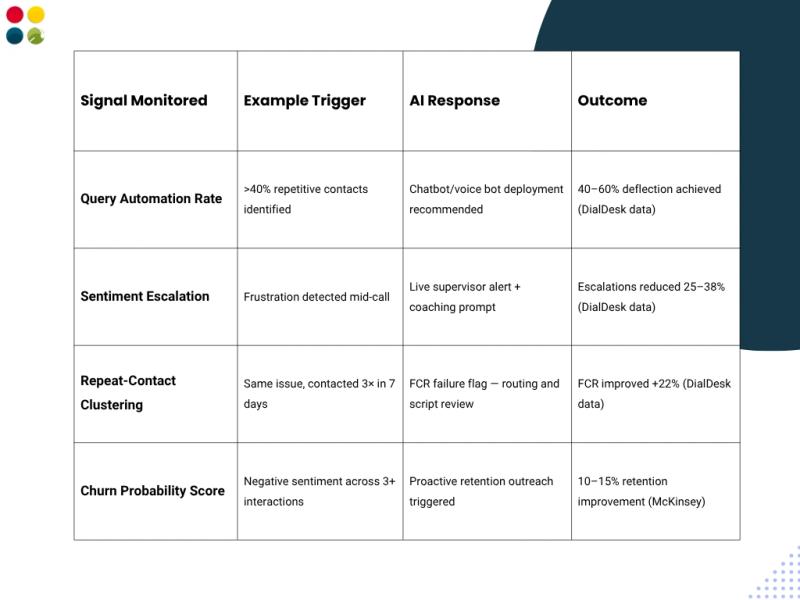
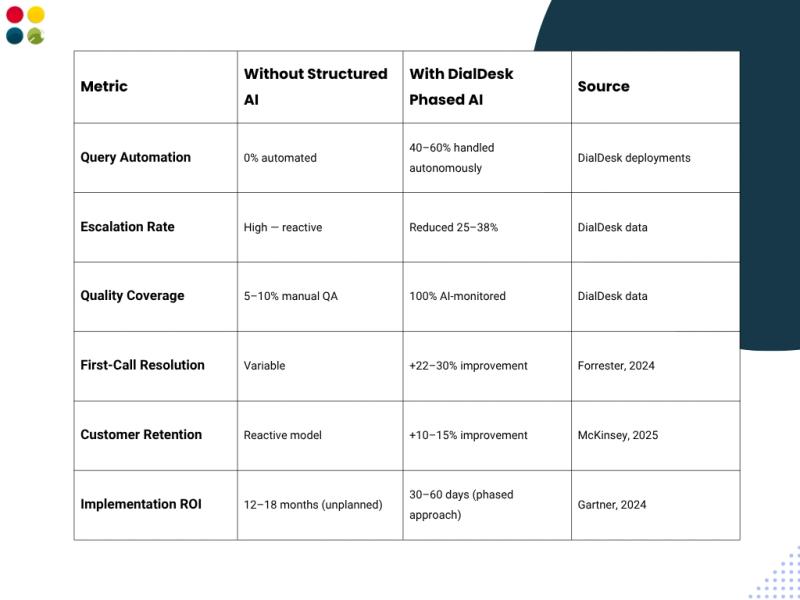
Business Impact: What Structured AI Implementation Delivers
Businesses that implement AI in Customer Service in a phased, use-case-prioritised approach achieve compounding results (McKinsey, 2025):
✅ Trusted by 500+ Contact Centers Across India
DialDesk's AI in Customer Service implementation framework is ISO 9001:2015 and ISO 27001:2013 certified. Enterprise-grade AI customer service — deployed across Healthcare, Banking, Retail, Telecom, and FMCG — with measurable ROI typically visible within 30 days. See our full call center software India platform.
Key Takeaways
• How to Use AI in Customer Service — start with conversational AI, then build through sentiment, automated QA, routing, agent assist, and proactive retention in sequence.
• AI in Customer Service delivers ROI in 30–60 days when implemented in a phased, use-case-prioritised approach (Gartner, 2024).
• Phase 1 — conversational AI automates 40–60% of routine contacts — the fastest and highest-ROI starting point for most businesses.
• Automated QA replaces 5–10% manual sampling with 100% interaction monitoring — delivering objective quality intelligence across every agent.
• Proactive retention AI identifies churn signals before customers disengage — McKinsey (2025) documents 10–15% retention improvement.
• DialDesk implements all six use cases on a single managed platform — no hardware required, live within 30 days.
Conclusion
How to Use AI in Customer Service? Start with automation. Build through intelligence. Optimise continuously. The businesses that get this right do not just improve their customer service operations — they build a structural CX advantage that compounds with every interaction.
The brands winning on customer experience in 2025 are not those that deployed AI first. They are those who deployed it correctly — in sequence, with clear metrics, on a platform that connects every capability into a unified intelligence engine.
Explore how DialDesk's AI in Customer Service platform connects with your IVR, call routing, and cloud telephony India stack — live within 30 days, no hardware required.
Implement smart. Scale fast. Retain more. DialDesk makes it happen.
✅ Trusted Signal: DialDesk's Certifications
ISO 9001:2015 (Quality Management) · ISO 27001:2013 (Information Security) · 500+ contact centers across India · Deployed across Healthcare, Banking, Retail, Telecom, and FMCG verticals.
📅 Want to Implement AI in Your Customer Service, the Right Way?
DialDesk's AI in Customer Service implementation guide is backed by 500+ deployments across India. Get conversational AI, real-time sentiment, 100% automated QA, and proactive retention — live within 30 days, no hardware required. Book your free demo today.