Why App-Switching Is Quietly Draining Your Contact Center
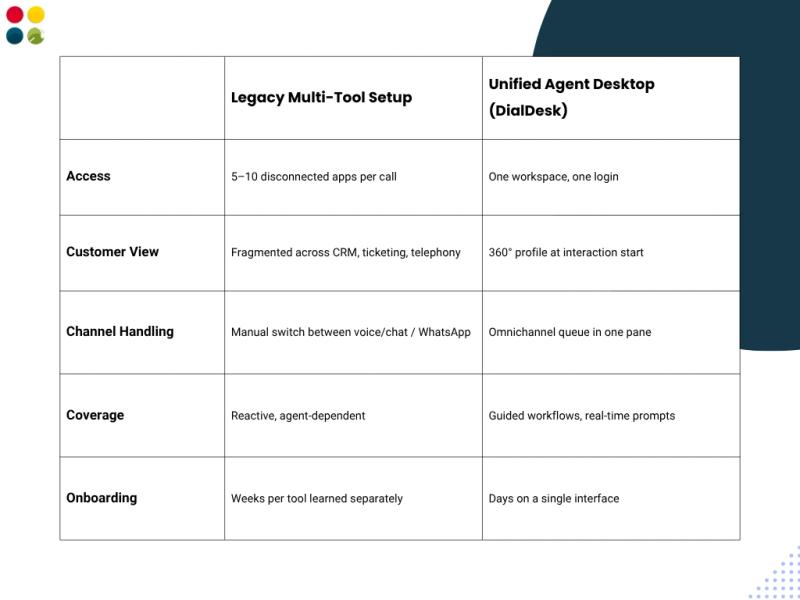
Agents commonly work across five to ten separate applications during a single shift: a CRM, a ticketing tool, a dialer, a knowledge base, and a chat console, each with its own login. Industry research from Skan AI found that agents switch applications more than 40 times during an average call, adding minutes of hidden overhead to every interaction.
Multiply that across a 200-seat floor, and a Contact Center is losing hours of productive capacity every day, not to poor training, but to poor tooling. This is exactly where Cloud Contact Center Software built around a Unified Agent Desktop changes the equation: one login, one screen, every customer record already in view.
💡 Why It Matters
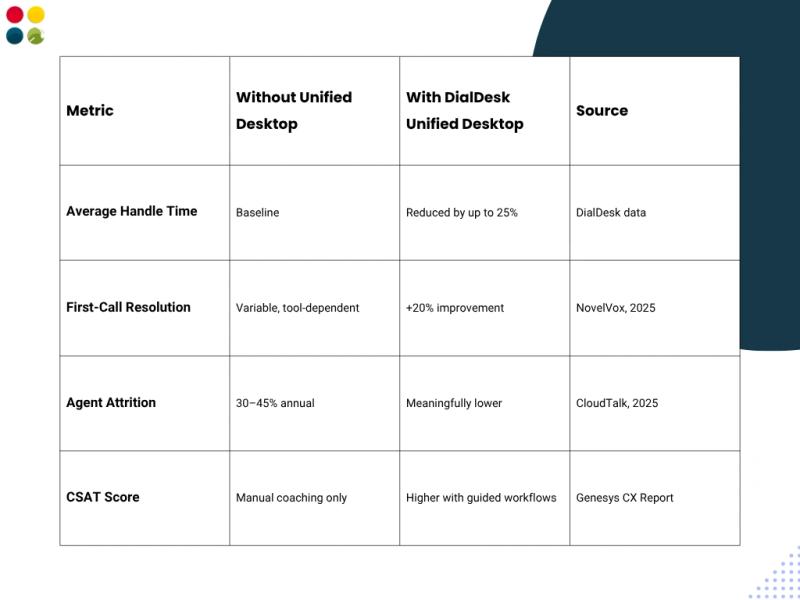
Agent attrition runs at 30–45% annually in many contact centers (CloudTalk, 2025), and daily friction from clunky tooling is a major contributor. Cutting screen-switching reduces burnout as much as it reduces handle time.
What Makes a Unified Agent Desktop Different from Legacy Multi-Tool Setups
The Mechanics: How a Unified Desktop Removes Friction
Modern unified agent desktops break the workflow into four components that eliminate the manual work agents used to absorb silently:
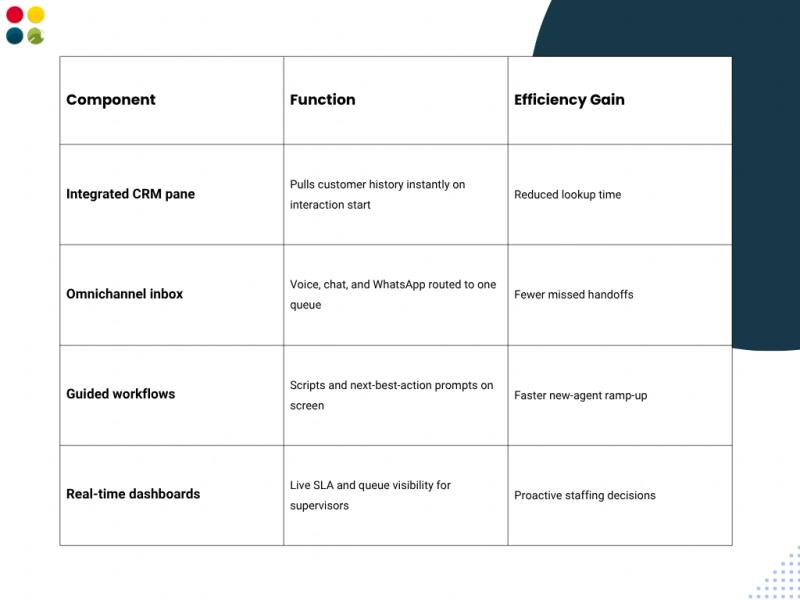
Agents commonly save close to 15 minutes per hour once system-toggling is removed from the workflow — time that converts directly into more resolved queries in the same shift, without adding headcount.
Business Impact: The Numbers Behind a Unified Desktop
Efficiency here is not a soft metric. Contact centers that consolidate onto a Cloud Contact Center Software platform with a unified desktop see compounding, measurable results:
✅ Trusted by 500+ Contact Centers Across India
DialDesk's Unified Agent Desktop runs on an ISO 9001:2015 and ISO 27001:2013 certified Contact Center platform — enterprise-grade reliability built for India's operating environment. See the full Cloud Contact Center Software platform.
🔒 Enterprise-Grade Security, Zero Hardware
DialDesk's cloud-native architecture means Contact Center Outsourcing Services partners deploy a unified desktop across distributed teams without on-premise servers, backed by 24/7 uptime monitoring and encrypted data handling.
Key Takeaways
• App-switching, not agent skill, is the hidden efficiency drain in most contact centers.
• A Unified Agent Desktop consolidates voice, chat, WhatsApp, CRM, and ticketing into one workspace for every Contact Center agent.
• Removing screen-toggling saves close to 15 minutes of agent time per hour.
• Consolidation on Cloud Contact Center Software lowers attrition and lifts first-call resolution together.
• DialDesk supports Contact Center Outsourcing Services partners with the same unified desktop used in-house.
Conclusion
A Contact Center is only as efficient as the tools its agents use every day. Fragmented systems cost minutes per call and, over a year, cost entire teams to burn out. Consolidating onto a single unified desktop is one of the few changes that improves speed, accuracy, and morale at the same time.
Explore how DialDesk's unified desktop connects with your IVR and call routing and cloud telephony India stack to deliver a fully unified agent workspace from day one — no hardware required.
One screen. Every channel. A faster Contact Center.
📅 Ready to Unify Your Agent Desktop?
DialDesk's Unified Agent Desktop brings voice, chat, WhatsApp, and CRM data into one screen — cutting handle time and boosting first-call resolution across every Contact Center team. Join 500+ contact centers across India already running on DialDesk.